Enable one action per placement instead of one action per campaign
I've noticed that SI executes one rule on each campaign at a time. This approach is not effective since each campaign has three individual placements and at some moments, each placement might need adjustment. For example, we might need to increase TOS (Top of Search) while decreasing ROS (Rest of Search) simultaneously. Currently, SI executes one rule based on priority which is preventing me from achieving the ideal output for placement rules. I request the SI team to consider each placement individually and allow each placement to be adjusted separately when rules are executed. Example As you can see in the attached picture, if I apply these rules, SI will first execute the product page decrease rule four times to make it 0% then would SI be able to increase the percentage of the rest of the search. I hope this example clarifies the importance of this feature and that you will expedite its implementation.
Hourly Bid Adjustments
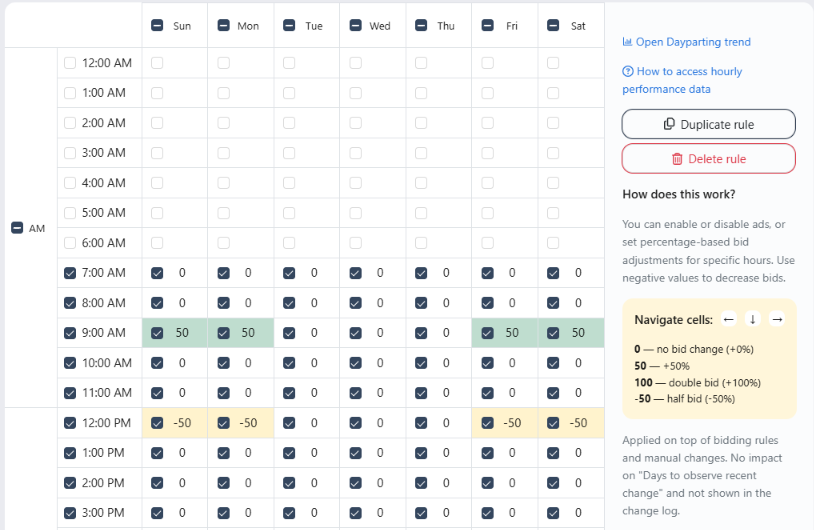
We've introduced Hourly Bid Adjustments on the Dayparting Rule page. This feature allows you to adjust keyword bids at specific hours of the day, giving you more control over your advertising spend and performance. You can increase bids during peak conversion hours and lower them during less profitable periods, helping you optimize traffic without fully pausing your ads. Check out the details in our June Release Note: Dayparting Rule: Hourly Bid Adjustments
Save Search Term Data Beyond 65 Days
Save Search Term Data Beyond 65 Days that is currently available on amazon to better make decisions on negating non-performing search terms
Ability to add tags to keywords
So we can keep an eye on top keywords, paused keywords, branded kws, etc Do analysis, reporting, clustering, ... Long term, add to bidding algo
Request for Scale Insights MCP Server Integration with AI-Powered Strategy Creation
Dear Scale Insights Team, I'm reaching out to propose the development of an MCP (Multi-Cloud Protocol) server that would integrate Scale Insights' powerful PPC management platform with conversational AI capabilities. Project Scope I'd like to request the development of an MCP server that would: Connect to Scale Insights API: Establish secure connections to access campaign data, rule configurations, and performance metrics from Scale Insights. Enable AI-Powered Strategy Creation: Allow users to create and modify automation rules and strategies through natural language conversations. Transform Conversations to Rules: Implement a system that can interpret conversational requests and transform them into properly configured Scale Insights automation rules. Use Cases This integration would enable: Simplified Rule Creation: "Create a bidding rule that increases bids by 30% for keywords with less than 100 impressions in the last 7 days" Strategy Development: "Set up a complete new product launch strategy for my product in the health niche" Performance Analysis: "Analyze my campaign performance and suggest optimization rules" Quick Adjustments: "Update my existing bidding rules to be more aggressive during the upcoming holiday season" Technical Requirements The MCP server would need: Secure Authentication: OAuth or similar secure authentication with Scale Insights Structured Data Exchange: Well-defined schema for passing rule configurations Conversational Processing: NLP capabilities to interpret PPC-specific requests Rule Validation: Logic to ensure generated rules follow Scale Insights' parameters and best practices User Confirmation Flow: Preview and confirmation steps before applying changes Benefits This integration would significantly enhance the Scale Insights platform by: Making advanced automation more accessible to users of all experience levels Reducing the learning curve for new Scale Insights users Enabling faster strategy implementation Providing an innovative differentiator in the Amazon PPC tool market Next Steps I would appreciate your feedback on this proposal and would be happy to discuss: Technical feasibility Development timeline Potential pricing models Required permissions and access levels Testing and implementation process Thank you for considering this request. Scale Insights' powerful rule-based automation combined with conversational AI would create a truly next-generation PPC management experience. Looking forward to your response.
AMC - Hourly data in Ads Insights
API Access
API we can have access to to be able to call data and set data points
Tags for keywords in the "Keyword Ranking"
It would be great to be able to tag keywords in "Keyword Ranking" with a customizable keyword category or at least with a star so you could use them as a filter.
Request to Integrate AWD API with Scale Insights for Enhanced Forecasting
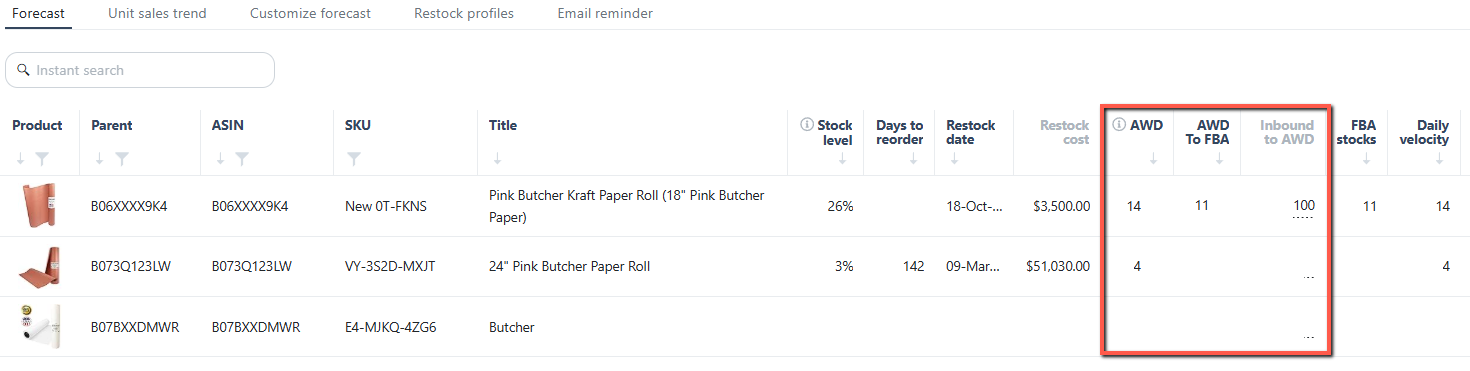
The AWD inventory is now integrated into the Restock Forecasting and Product Inventory Value pages, offering a more comprehensive view of your total inventory. Check the full update in our October Release Note: Added Amazon Warehousing and Distribution (AWD) Stocks
Search Query Performance
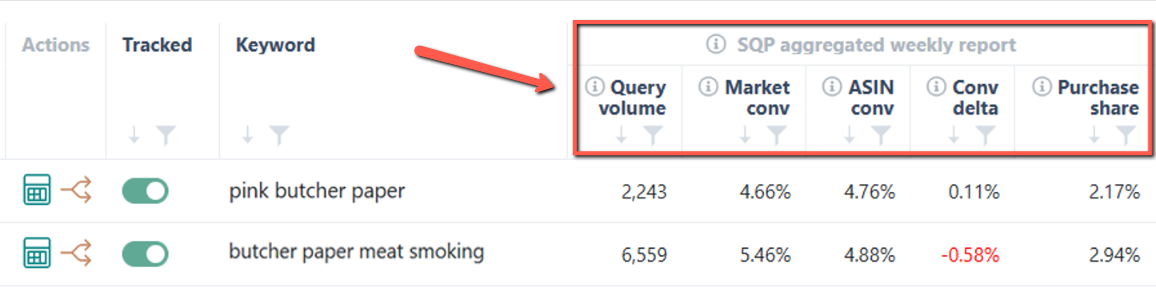
SQP data is now available on the Ranking page, enabling you to effortlessly analyze SQP, PPC performance, P&L, and both organic and ad rankings—all in one unified view. Read the details in our March Release Notes: Keyword Ranking: Integrated Search Query Performance (SQP) data
Sales Trend (including Monthly) on Parent Level
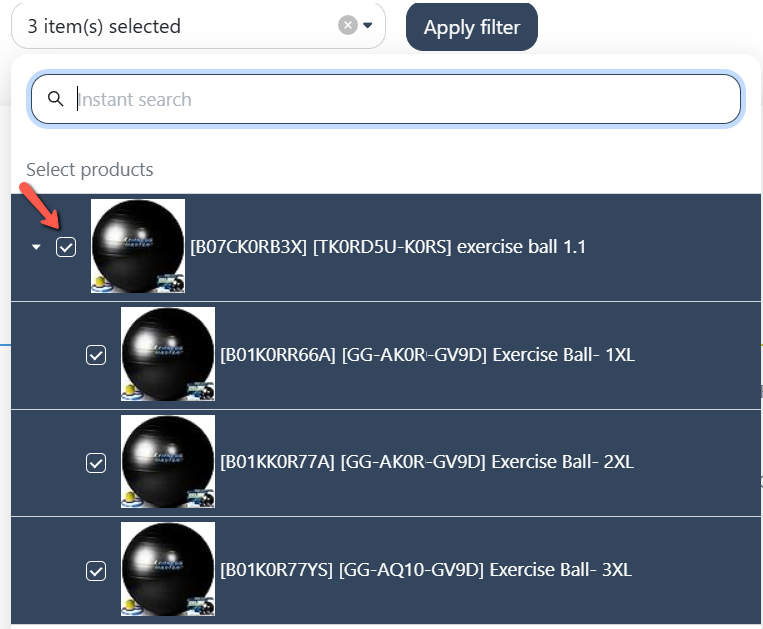
We've added the ability to search and filter products by Parent ASIN in the product selection bar. Instead of selecting Child ASINs one by one, you can now choose a Parent ASIN to automatically include all its associated Child ASINs, making product selection and analysis more efficient. You can still select individual Child ASINs separately. Check out the details in our June Release Note: Product Selection: Parent ASIN Filtering
"Select all" button
Hi, is it possible to implement "Select all" button on the ASIN selection screen instead of clicking them one by one?
Add "Placement rule" to Strategic Objectives
Placement rule can be used to improve the ranking objectives in particular - but also others. It should be added to the Strategic Objectives to make it easier to include when focused on ranking objectives or similar.
Budget rule limit (Min / max based on average ad spend of campaign)
I rarely use the daily budget rule but now I find myself in a situation where I need to do so. I'm currently tasked with tightly controlling the budgets. Upon deep diving in rule, I've noticed that the existing options like baseline budget, min and max budget isn't suitable for me. Let me explain: I have thousands of campaigns each having a different baseline, min and max. I'd need to create a bunch of rules and apply them properly otherwise campaign budgets will be compromised. I can't afford to under budget or over budget campaigns randomly, especially since I'm operating in the supplement niche, which has the potential to spend 10 times more in a day compared to the daily average. Therefore I request that you add the same percentage based limit of daily average ad spend as we have in bidding rules. This way I could ensure that all underperforming campaigns stay under budget while allowing good campaigns to spend more and we could also prevent insane budgeting. Additionally I request customizable look back periods (each rule level) to review average of desired date range and days to observe too to avoid aggressive actions on daily basis.
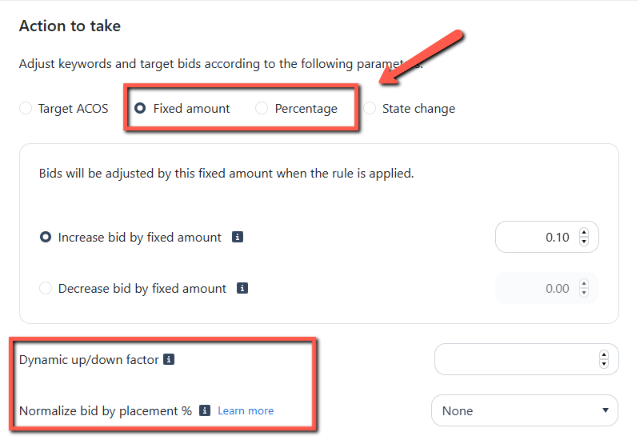
A Placement Normalizer for bid adjustments beyond Target ACOS
We’ve improved Fixed Bid adjustments by allowing bid normalization for keywords or targets when using fixed amount or percentage changes. This enhancement ensures more accurate and consistent bids that align with your campaign setup, including Placement % modifiers and Dynamic Up/Down bidding. Read the details in our November Release Note: Bidding Rule: Added "Normalization by Placement % & Dynamic Up/Down" on Fixed Bid adjustments
Bulk file for making manual changes to campaigns, ad groups, placements and ad groups
Hi, do you consider integrating a bulk file upload option for SI? Especially for those marketplaces with lots of Campaigns and Keywords it is verry time consuming to pause keywords or adjust bids in scale, since also the filter options in SI do not work 100%. For us it would be way faster to download a spreadsheet, do the changes in Excel and upload the Spreadsheet again to SI.
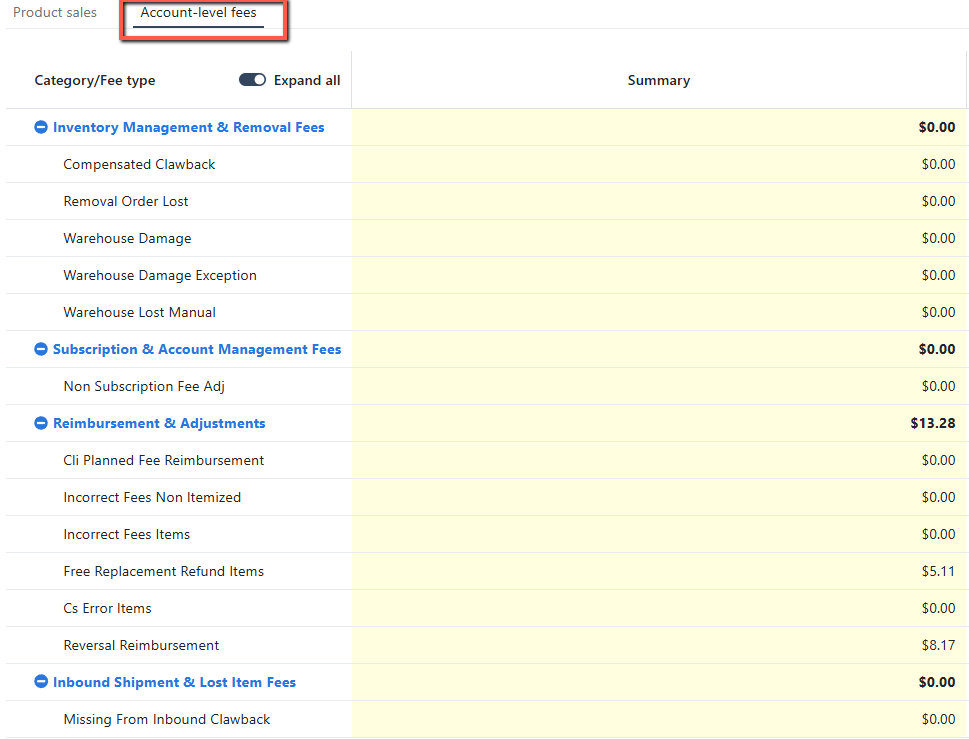
Account level fees on dashboard
We have included Account-level Fees, such as "Inventory Management & Removal Fees" and " Subscription & Account Management Fees," to the Main Dashboard sales table. Read the details in our May Release Note: Main Dashboard: Added Account-level Fees
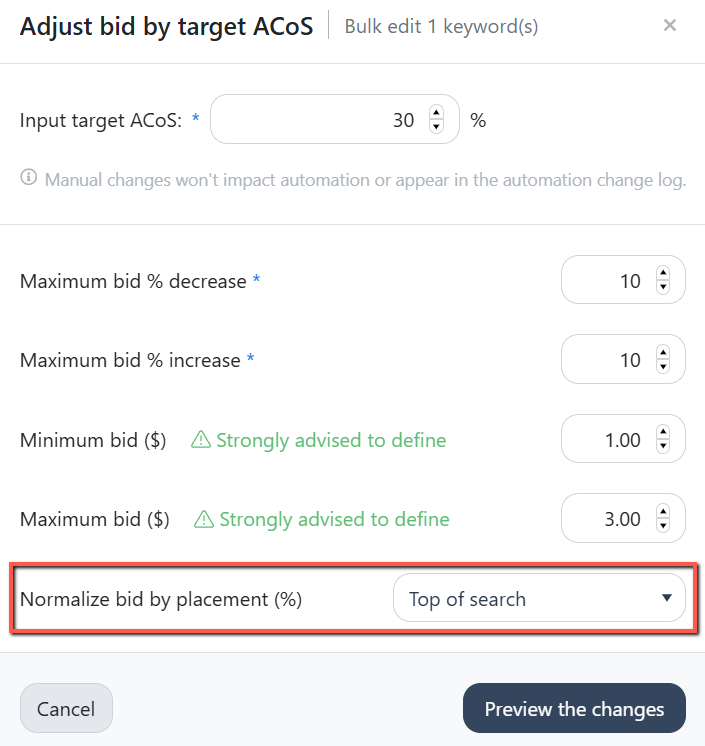
Add "Normalize bid by placement" when manually updating bids on Ads Insights - Performance page
We’ve added bid normalization by placement percentage to the Ads Insights manual bid adjustment feature. This lets you adjust manual bids based on placement modifiers for Top of Search, Product Page, Rest of Search, or the placement with the highest percentage. Check out the details in our August Release Note: Ads Insights: Introduced "Normalized bid by placement" in Manual bid adjustments
Agency KPI dashboard where we can see all the accounts we manage. Overview with the most important KPIs, similar to the dashboard overview, yesterday, last 7 days and last 30 days
Search Term Tab Doesnt Include Search terms generated from Multi ASIN Campaigns
Search term tab only includes those search terms which are generated through single ASIN campaigns but dont track those search terms/ASINs generated from Multi ASIN campaigns. If we have search terms from Multi ASIN campaigns in Search term tab of SI, it will be quite easy to do negations
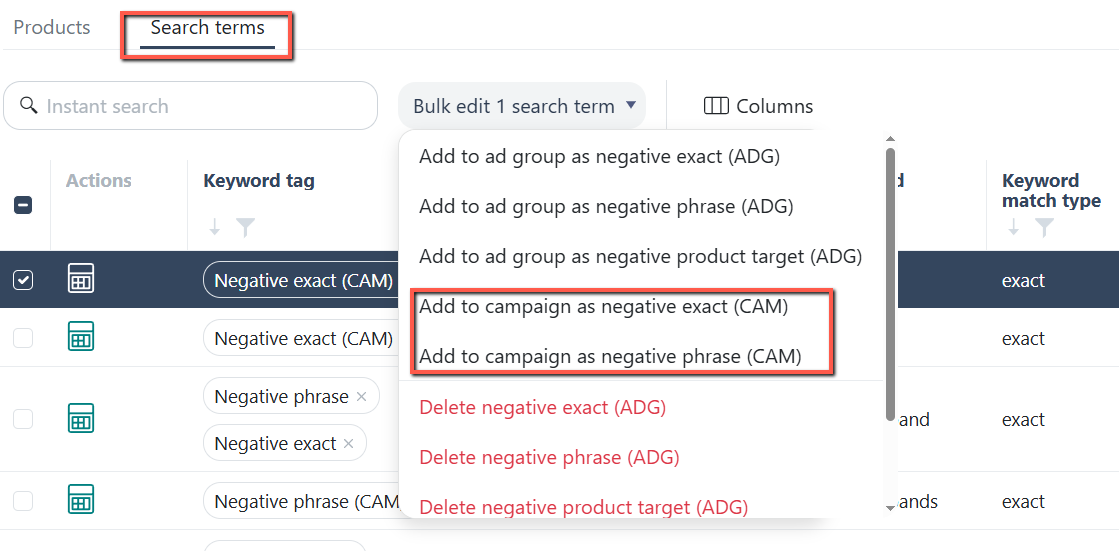
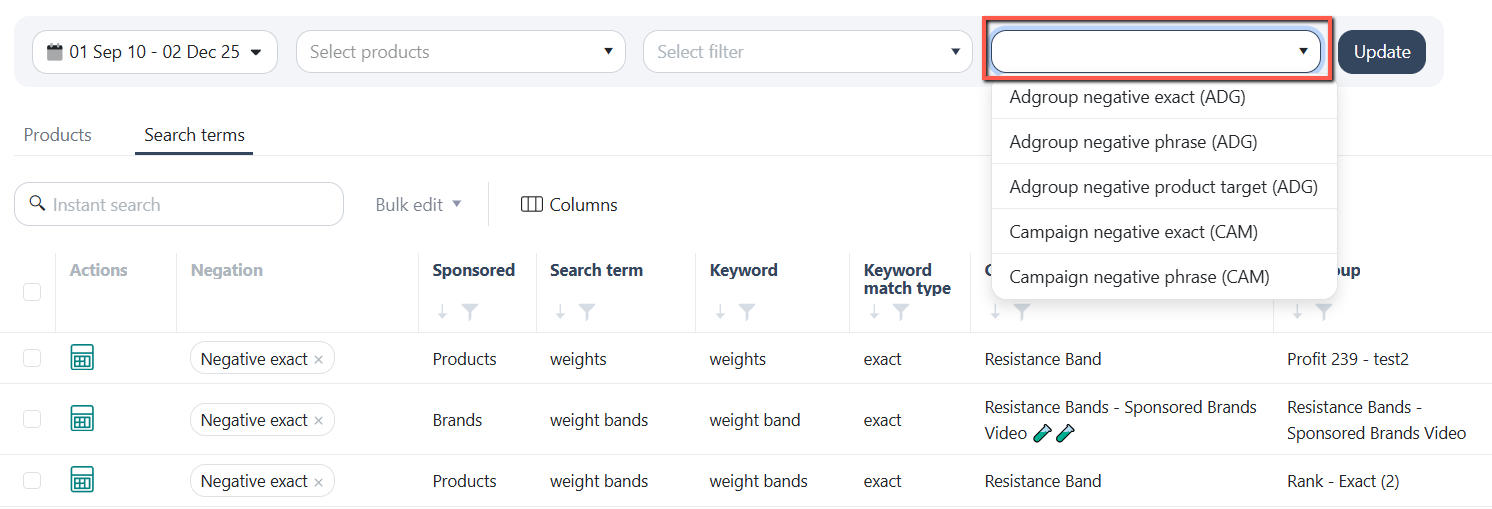
Campaign Level Negation Rule Option For Negating Keywords Generated from Product Targeting Campaigns
You can now manually add negative search terms at the campaign level, making it simpler to apply the same negations across multiple ad groups within a campaign. Read the details from our June Release Note: Ads Insights: Enabled Manual Search Terms Negation at Campaign Level
Automation based on inventory level
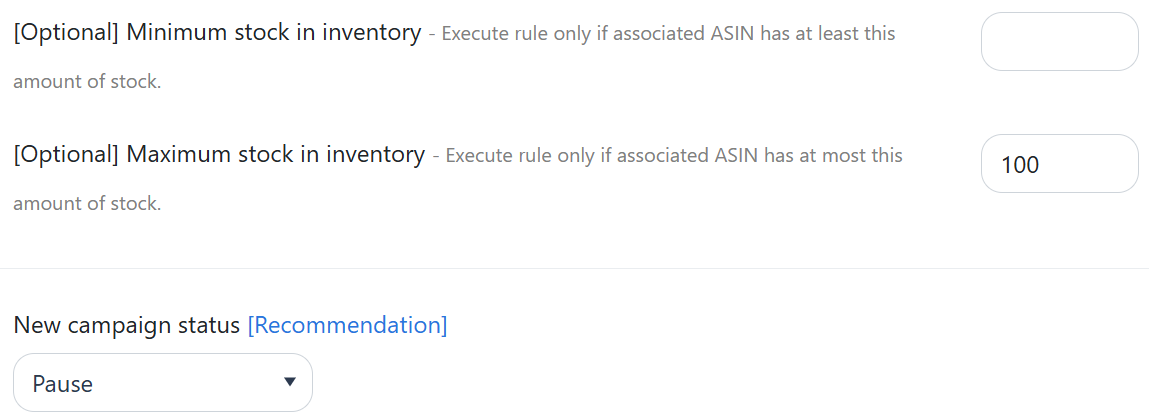
You can now set a Status rule based on product stock levels using the newly added "Minimum/Maximum Inventory Stock" options. Check out the details in our May Release Note: Automation: Added "Stock Quantity" as a Status Rule condition
Bulk Import "Excluded Dates"
We’re currently managing 7 accounts across 5–8 marketplaces each, and manually excluding dates (e.g., 6 days × 56 accounts) is quite time-consuming. It would be incredibly helpful if there’s a feature to bulk import or apply “excluded dates” across multiple accounts at once. Thanks for considering this!
Vendor Central Ads Connection (Rainforest)
We're currently using Scale Insights for PPC automation, which supports only Amazon Seller Central accounts. However, since both Seller Central and Vendor Central advertising operate through the same Amazon Advertising API (Advertising Console), enabling Vendor Central integration should be a straightforward extension. For Vendor Central, we don’t need access to the Vendor Central dashboard or analytics—just connection to the Ads Manager for campaign management and reporting. This should require minimal adjustment to support. We need a VC ads API connection as we have Ads that we need to automate on VC. Looking forward to this feature! :)
Increase lookback period for all of the algorithms
I know rules can only use 90-days of historical data, but is there any potential to extend this window?
Multi-account MCP
Connect the MCP once and work across all of your Amazon accounts from a single place, instead of connecting each account separately.
Add CTR delta metric in the SQP report
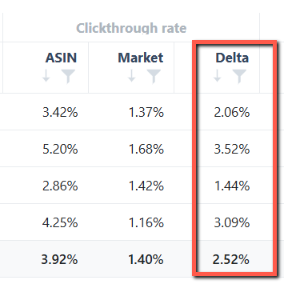
We added CTR Delta to track click-through rate changes over time and enabled SQP column selection so you can show or hide metrics in the weekly report as needed. Check out the details in our February Release Note: Keyword Ranking: Added CTR Delta and enabled individual SQP columns selection
Manually Edit Bids in Change Log
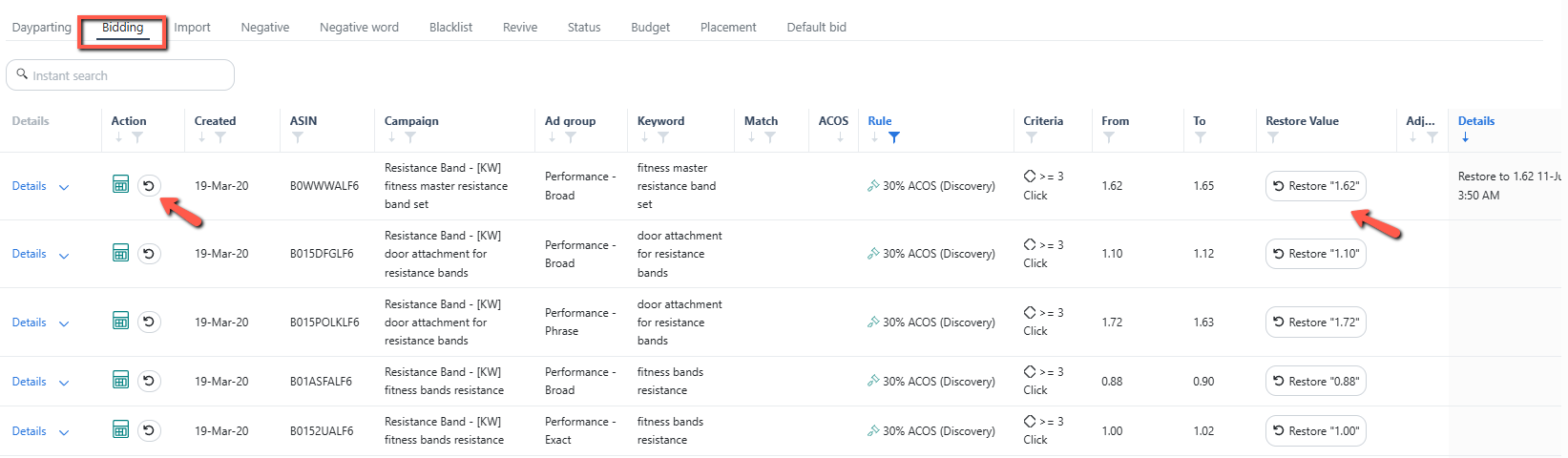
You can now reverse a bidding rule action applied to a specific keyword directly from the Change Log. Read the details in our June Release Note: Automation: Added Revert Bid action on the Bidding Rule Change Log
Add "Avg Time in Budget" Metric for Budget Rule Automation
Could you please add a criteria metric called "Avg Time in Budget" for Budget Rule automation? My goal is to increase the budget only when it frequently runs out, indicating high demand. Additional request: If possible, please also apply this feature to Sponsored Brands and Sponsored Display, as currently only Sponsored Products appear in the budget tab.
Performance: Bid Adjustments based on the average CPC
Add an option in Performance Bid Adjustments to adjust bids based on the current average CPC. This would help when reducing spend is the priority, rather than focusing solely on ACOS goals.
Regel für das automatisierte Einstellen von Budgets auf Portfolio Ebene
Eine Regel, die beispielsweise täglich das gewünschte Tagesbudget auf Portfolio Ebene einstellen kann, damit man das nicht täglich manuell kontrollieren und eventuell wiedereinstellen muss.
Building dayparting rules based on AMC hourly performance data
Claude Connector
Make a direct connector for Claude to be easy to manage, analyze, create campaigns, etc.
Create Strategic Objectives using bulk file
Add Current Bid to Criteria profiles
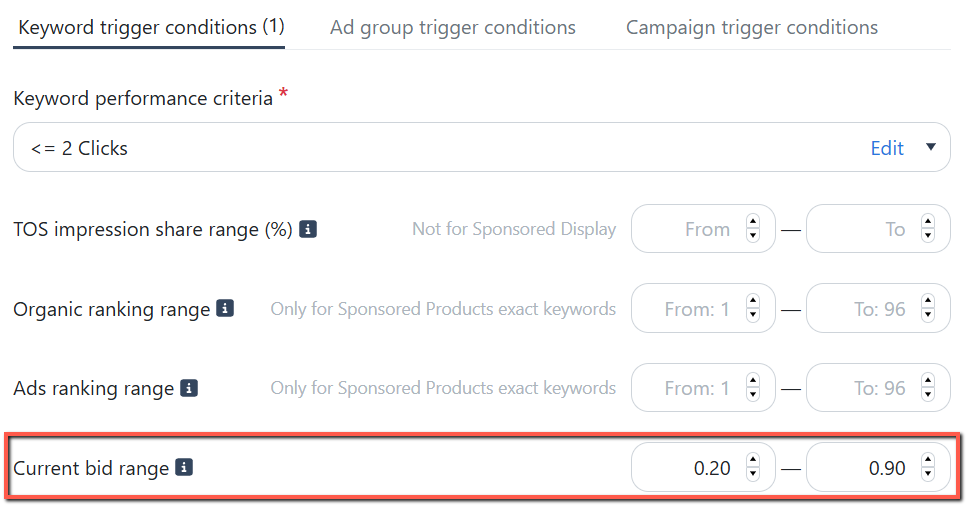
You can now set Bidding rules based on a keyword's Current Bid, allowing for more precise and targeted bid adjustments. Read the details from our May Release Note: Automation: Added "Current Bid" as a Bidding Rule condition
Ability to add TAGs to Parents / Childs to group same product categories
Can be helpful to identify the development over time. This should be part of the dashboard overview as well as sales trend. Just another filter in the navigation with TAGs i. e.
Bidding Criteria - Making TACoS as a criteria
By any chance is there a way where we can set the TACoS as a bidding criteria for all the rules? not target ACoS
Ability to manually add new keywords to existing campaigns and ad groups
Set specific day to run each Bidding Rule
Would like to be able to change bid per days of the week. So I can lower bid on weekend and not have to close ads.
Rank Tracker: Include the SQP data in download file
We've enhanced the Keyword Ranking report by adding key SQP and PPC metrics to the Excel export. You can now access Query Volume , Market Conversion Rate , Spend , Units , and CPC —all in a single report for easier analysis. Check out the details in our June Release Note: Keyword Ranking: SQP and PPC Data in Excel Downloads

Add Bulk SKU management (switch on/off) under Performance Tab for SP Ads to allow for complete control over campaign levers replacing SS.
Access stats and change the state of the ad group's advertised ASINs. Read the details in our May Release Note: Ads Insights: Added "Product ads" Performance tab
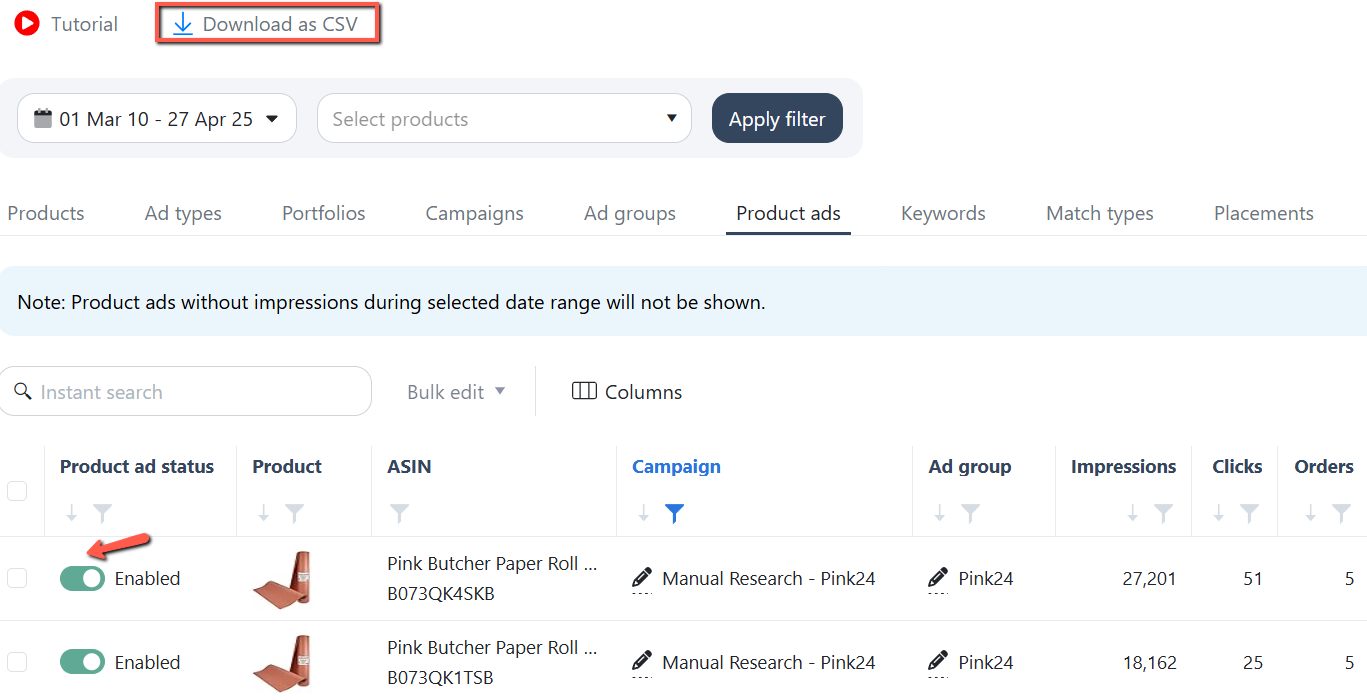
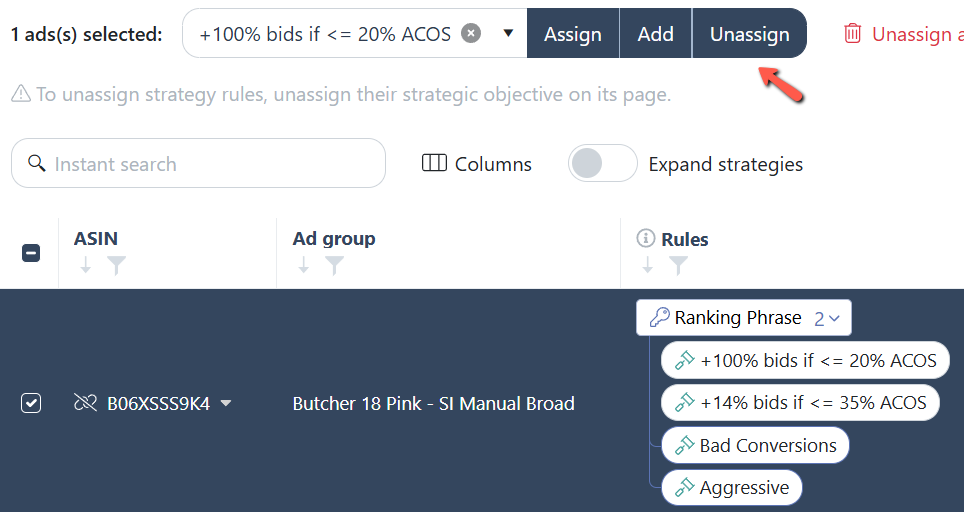
Easier way to unassign 1 rule from the rule stack
You can now easily remove individual rules using the new "Unassign" option. Simply highlight the ad group, choose the rule from the dropdown menu, and click "Unassign. View the full update in our May Release Note: Automation: Enabled unassigning specific Rules from the Rule Stack
Historical Stock Data
Hi Scale Insights team, It would be really helpful if we could view stock levels for a given date range, similar to how other metrics are displayed. While forecasting is great, having historical stock data would allow us to better understand sales drops. For example, we experienced a significant sales decline in April 2025, which may have been due to a stockout. However, since the item is now restocked, we can’t confirm if that was the cause. Being able to track how often we go out of stock over time would be a valuable addition for campaign analysis and planning. Thanks for considering this!
Enable linking on SB ads
Placements Performance: Add TOS Impression Share column
Feature suggestion: in the ads insights section, when i am at performance, i'd like to see at the placements tab the column showing metric TOS impression share, this way i can see in a same column my tos impression share and my tos adjustmentm right now i can't see that metris inside that especific tab, you do have it inside tab keywords for example
Add BSR & Category Data for ASIN Targets in SP and SB Campaigns
Please consider adding BSR (Best Sellers Rank) and Category data for ASIN targets within Sponsored Products (SP) and Sponsored Brands (SB) campaigns. Having this information directly in Scale Insights would make it much easier to evaluate ASIN targets, understand competitiveness, and optimize targeting without needing to manually look up each product in Amazon.
Product Ads (Performance) Additional Metrics
Suggestion: Add a column or metric that shows how many ASINs were enabled inside the campaign. I want to pause ASINs that are bleeding. Some campaigns have only 1 ASIN, some have 3 variations. I don't want to pause a product that is solo inside a campaign/adgroup. I want to pause ASIN that are bleeding so other variation gets the order/traffic.
Keyword Rank alert
Is it possible to activate alerts if our organic rank for a KW drops or increases by let's say more than 3 ranks in order to inch up or lower bids for that same KW? This would be super helpful.
Bulk Bid adjustment based on CPC and Break Even Bid.
On the Adsinsights > Performance > Keywords > Bulk Edit page, it should be possible to set the current bid based also on the actual CPC and the Break Even Bid.
Product Level Adjustment
If the product is almost out of stock, there's a rule that slows down PPC. If the product is OOS, pause the product variation. If the product is alone, change the campaign name. If the product is not alone, just pause the variation. If the product is bleeding based on rules (0 order, clicks > X) or (Orders <= 2, ACOS > 50%) the pause it.
Automation report email (daily, weekly, monthly)
I want to have the function that i can get report data from SI daily or weekly about sales or ppc data to my email.
Enable hourly budget adjustment
In today's marketplace dynamic it is crucial to be able to scale up or down budgets depending on what competitors are doing. For example if your main competitors are running LD or BD or Price Discounts in that day, your best performing campaigns can have 2 times lower ROAS. If they are scaled the previous days and are spending a lot, having a such a day will impact negatively your profitability. And the other way around. If you as a brand are running deals, your campaigns might perform great in that day. Meaning budgets should be scaled if they are positive.
Calculate CLV with COA
Would love to see CLV by ASIN. I am sure that every brand and business owner would appriciate this.
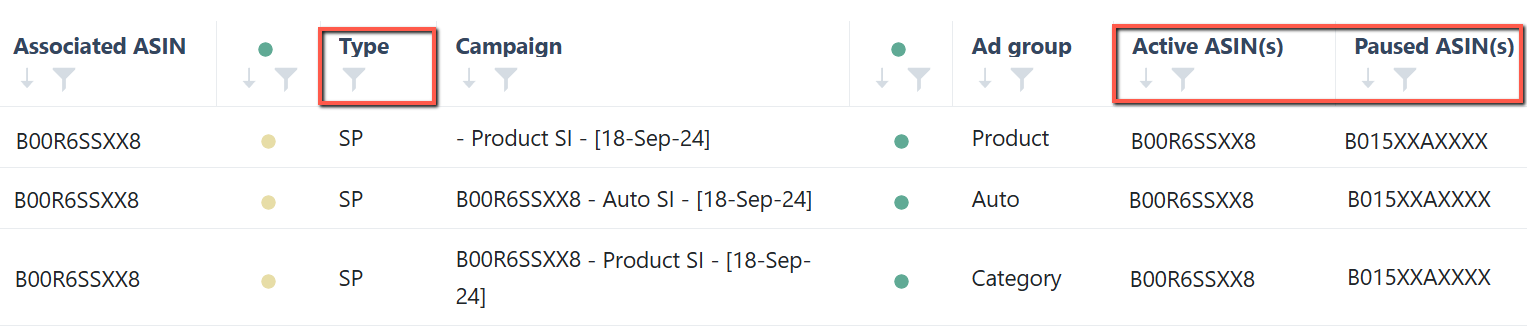
Link Ads with ASINs: add columns to show active and paused ASINs
Added “ Active ASIN(s) ” and “ Paused ASIN(s) ” columns to the Link Ads with ASINs page for easier visibility of ASIN status per ad group. A new “ Type ” column was also introduced to identify the associated sponsored ad type. Check out the details in our September Release Note: Ads Insights: Added "Active" and "Paused" ASINs columns
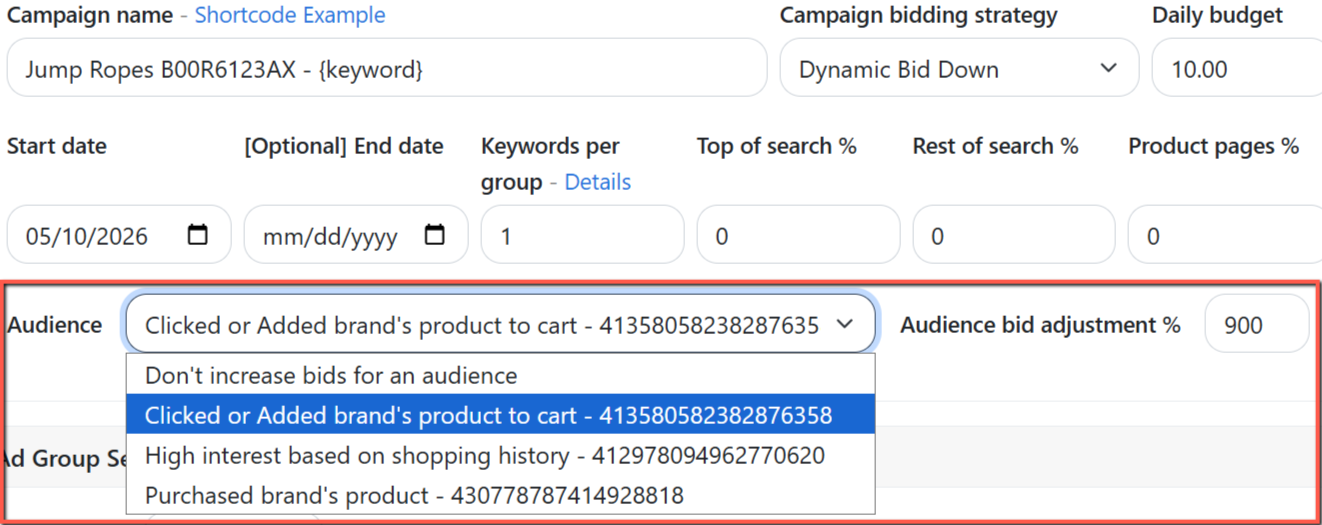
Add AMC Audience Creation + Bid Modifier
You can now use Audience bid boosting for Sponsored Products through Split Keywords to Campaigns (SKC) and Bulk Auto Campaigns (BAC). This lets you increase bids for high-converting audience segments, improving targeting and performance. Check the full update in our May Release Note: Mass Campaigns: Added AMC Audience Bid Boost for SKC and BAC
Keyword Ranking: Parent including Child-View
Bit like the Dashboard View when you log into SI, seeing the sales and best child to identify what child has already been tracked and whether it is necessary to track another child.
Rank Tracker: Graphical view of ranking trend
Add Option to Adjust Bids and Pause Targets Directly from the Ranking Tracker ✅
Could you please add the option to change bids or pause targets directly from the Ranking Tracker? The Ranking Tracker is extremely useful. What I especially like is being able to see the sponsored and organic ranks side by side on a daily basis. A common use case is when I’m running ranking campaigns. For example: If I see that I’m not getting Top of Search visibility, I could immediately increase the bids. If I’m ranking very well organically, I could lower the bids to save costs. Additionally, having visibility into which targets are attacking the same search term is very helpful, since it allows me to identify and pause overlapping targets to prevent cannibalization. Adding the ability to adjust bids or pause targets directly from the Ranking Tracker would significantly improve workflow efficiency and make campaign management much smoother.
Add option to delete keywords in the rank tracker
Adjusts bids based on Amazon's suggested bid
Add a history log that shows which rules or strategic objectives were applied to a campaign when they were applied
Add the placement and bidding strategy information next to the current bid
Ads Insights Keyword Performance: Add Organic Ranking column
Would it be possible to have an Organic Ranking column in the Keyword Performance section of Scale Insights? This would be really handy to be able to see the Rank Values right there on the keywords we are tracking.
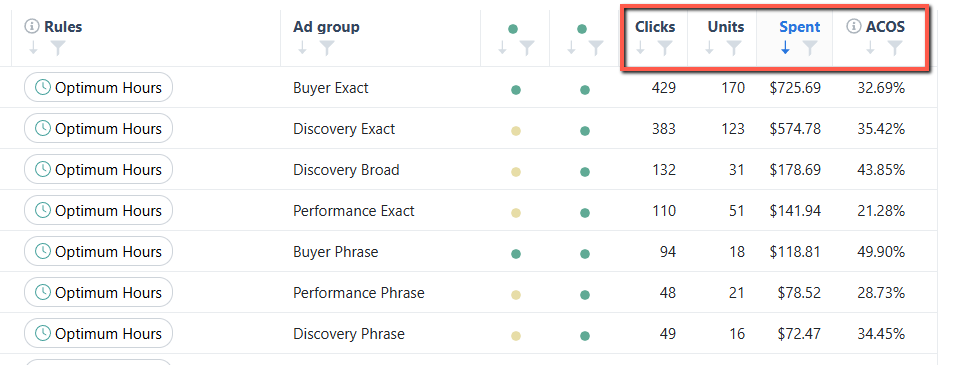
Dayparting - Adding Columns ACoS, Spend, Sales
Performance metrics, including Clicks, Units, Spend, and ACOS, are now available on the Dayparting Rule page for each ad group. The default analysis period is set to 30 days. Check out the details in our March Release Notes: Automation: Added Performance Metrics on the Dayparting rule page
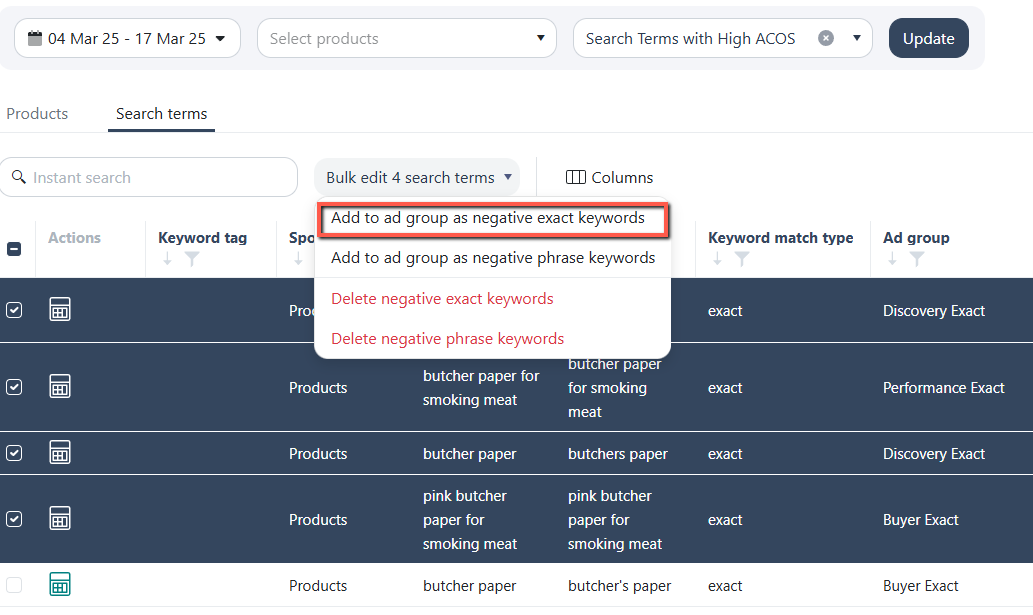
Manually negate search terms from Ads Insights
You can now manually negate search terms directly from the Search Terms page. Simply add them as either "negative exact keywords" or "negative phrase keywords" at the ad group level. To undo the negation, remove the keyword tag or use Bulk Edit and select "Delete negative exact/phrase keywords." Read the details in our March Release Notes: Ads Insights: Enabled Manual Search Terms Negation
add in budget % condition
When a campaign keeps running out of budget, it means the bids are too aggressive relative to the budget. Therefore, if there were a rule stating that once a campaign reaches a certain out-of-budget rate, the bids should be lowered ,either across all keywords or just the ones with the highest ACoS , it would help. Right now, we do this manually, and it significantly reduces the ACoS in the account
Rank Tracker: Add "ASIN UNITS SOLD" to SQP section.
SUGGESTION: Can you please add into SQP area (under ranking) 1 more column "ASIN UNITS" - so we can understand is "Conv delta" data valid or not! For me the "Conversion delta" is credible and valid ONLY IF it has at least 5 ASIN PURCHASES otherwise its misleading and actually dangerous data to make decision upon.
AdInsights Enhancement
The current Ad Insights – Performance View is less informative than it was previously. In the past, when viewing the Keywords tab, we could easily see the associated Campaign and Ad Group names alongside each keyword. Now, only the keywords/targets are displayed. Since many of us structure our campaign names based on placement strategies (such as TOS and Product Pages), having the Campaign and Ad Group information visible allows us to quickly understand the context without switching to another view. It would be very helpful if the Campaign Name and Ad Group Name columns could be restored in the Keywords and Ad Group views to improve efficiency and reduce the need for additional navigation.
Support Ads for Ireland Marketplace
Would be great if SI also supports rest of the Marketplaces that are currently not available.
Pause advertised ASINs in Ads Insights via bulk file
I have a large list of products that should no longer be advertised. This includes a list of more than 8000 ASINS. I need a quick way to disable these products in bulk or any other way. In other words, to remove them from advertising.
Business placement rules
have the new business placement as an option to be controlled through the placement rule
Bulk Action for changing "Settings for ads served off Amazon" in campaigns
Hi SI dev team, may I request the ability to change the 'Settings for ads served off Amazon' directly on the Scale Insights campaign page so we can opt to "Limit off-Amazon spend".
Rank Tracker: Add monthly search volume of search terms
Add option/filter to view all targets in Performance tab
Possible to view all targets in the performance tab even if they don't have any impressions within selected date range. So they can be inched up directly from SI instead of using bulk files or manually via ad console.
Quickly Spot Campaign Trends with a 30-Day Performance Graph in Campaign View
It would be super helpful to have a trend graph added at the end of each campaign row - showing how performance (e.g. ROAS or sales) is trending over the last 30 days compared to the previous 30 days. This way, we can quickly spot which campaigns are improving or declining without needing to dig into each one manually.
Increase bids based on CPC
For inching up targets, we either have to use Fixed bid or Percentage Increase but they don't have any base value to consider. It'd be great if we can get CPC as base measure to increase bids by certain fix value or percentage. This will avoid increasing bids too much
Add subscribe and save information from the SNS Dashboard
https://sellercentral.amazon.com/sns/dashboard The "Sales trend" section of scale insights could benefit from having this. That way we can see how our subscription count in going (Both account wide and per product), and see right away how does it compare to the rest of our KPIs.
Add the filter function on the "Negation" column
We’ve introduced a negation filter on the Search Terms page, making it easier to see which search terms were negated at different levels. You can filter by one or several negation types at the same time. Check out the details in our December Release Note: Ads Insights: Added a Negative Filter function
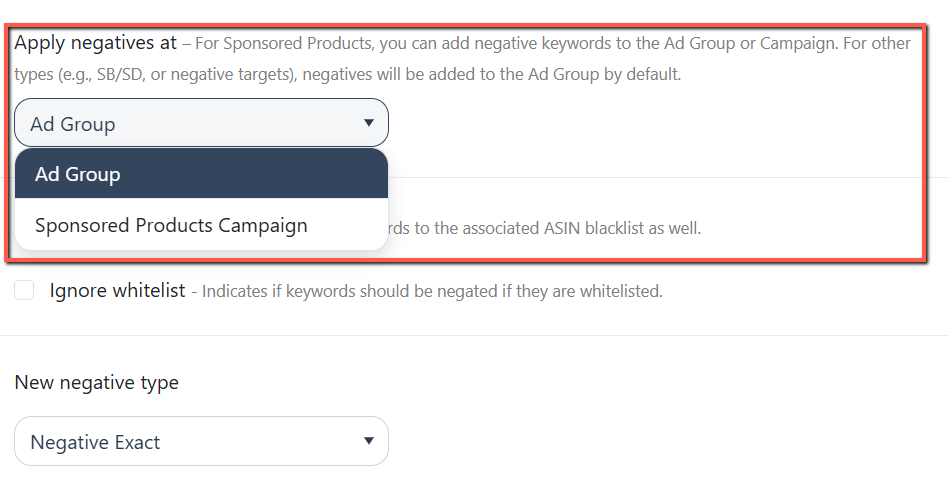
Campaign Level Negation Rule Option For Negating Keywords Generated from Product Targeting Campaigns
You can now apply negative search terms at both the Ad Group and Campaign levels. In the Negative Rule's “Apply negatives at” section, you can choose the level where negatives should be applied, giving you more control over your targeting strategy. Check the full update in our September Release Note: Negative Rule: Added Campaign-level negation for Sponsored Product campaigns
United Arab Emirates marketplace Support
It is growing marketplace with high potential.
Show the keyword's TOS-IS in the Change Log details
Data Binding in Google Sheets
Good morning I would like to know how I can link scale insights with Google Sheets, because I saw a video of a dashboard and saw the link
Add Option to Rename Campaigns Directly from the Placements Tab ✏
Can you please add the option to change the campaign name from the placements tab. Usecase: for me whenever I am having placmentes in the campagin I make sure to add it in the name as well. Adding this option would save much time. Currently it is possible in the other tabs but not in the placements tab.
Blacklist für Produkt Asins
Es wäre wünschenswert, wenn man nicht nur Suchbegriffe, sondern auch Asins auf die Blacklist setzen könnte. Beispielsweise die eigenen Brand Asins, damit man darauf in Auto Kampanien keine Werbung aussteuert.
Enable Import Rule on SB-HSA campaigns
Add a CPA (Cost per Acquisition) column in Scale Insights dashboards
Pause rule execution on specific campaigns without unassigning it
Include the inventory fees, subscription fees, removal fees and storage fees in the monthly P&L reports
Normalize bid by placement % for SB as well
Amazon just released placements options for SB Video - please allow to use the "Normalize bid by placement %" for SB as well and not only for SP
Allow Max CPC to be calculated dynamically based on the product’s average conversion rate (or our own given CVR if there's no data yet)
I’d love to suggest a feature enhancement for Bid Limits that I think could bring lots of value, especially when optimizing keywords with no impressions or no conversions yet. Allow Max CPC to be calculated dynamically based on the product’s average conversion rate (or our own given CVR if there's no data yet). This would let us automatically set a ceiling bid that still stays within target profitability Example: Let’s say: Product selling price = $40 Target ACoS = 25% Average conversion rate = 10% The formula for max CPC would be: 🧮 (AOV × Target ACoS) ÷ Clicks per Conversion 🟰 (40 × 0.25) ÷ (1 ÷ 0.10) 🟰 $10 ÷ 10 = $1 So, instead of letting keywords go up to a random max (like suggested bid), we can cap the CPC at $1, which matches our profit target based on how the product performs. ✅ Why this helps: Protects profitability Reduces wasteful high bids for low-converting ASINs Gives meaningful ceilings Fully customizable per product or per CVR range
Allow ToS and RoS Placement Rules to run independently without blocking each other
Currently, "Days to Observe Change" works at the campaign level – if any Placement Rule fires on a campaign, all other Placement Rules are frozen for the configured number of days, including rules for different placements. This creates a critical problem when running separate rules for Top of Search and Rest of Search on the same campaign. In practice, Rest of Search automation may never fire at all – because ToS rule conditions are met regularly and keep the campaign permanently frozen. Priority settings don't help here – Priority determines which rule executes when there's a conflict, but it doesn't lift the freeze for other placements. The only alternative is to remove Days to Observe Change entirely – but this leads to chaotic daily modifier changes, which damages campaign stability. This creates a dead end: either RoS automation doesn't work, or campaigns become unstable. Requested change: make "Days to Observe Change" placement-specific, so that: A ToS rule firing only freezes other ToS rules A RoS rule firing only freezes other RoS rules PP rules remain independent as well This would allow independent, simultaneous automation for each placement on the same campaign without sacrificing stability.
Allow “Active Date Range” as a Trigger Condition
When creating an automation, have the option to enter a “date range” as a trigger condition for an automation. For example, if an automation has an “active date range” of 10/1 to 12/31 (Oct 1 to Dec 31) then it would only be active and running during those calendar dates. Otherwise, the automation is switched off until the next date cycle. If this trigger is left blank, then by default the automation is active every day. This would allow a user to create an automation that follow seasonal trends or events. This trigger condition would be very beneficial for Q4 trends where many expect a boost in metrics (such as orders, clicks, impressions, etc) where their current automation isn’t set up for. Therefore, they are forced to manually turn off or edit the current automation and create a new one altogether. Thus defeating the “automation” part. Additionally it would allow a user to create special automations for specific events such as Prime Day or Black Friday. Usually these dates are announced ahead of time so you could prepare early without needing to manually turn on/off other automations. Currently, I’m sure you could work around this by assigning very specific priority values and trigger conditions, but even so, it would still have a chance for an unwanted automation to execute. It would be easiest if automations can be active and inactive during a given date range. I hope I was able to convey the request properly but please feel free to ask for more details. If others agree or have ideas to improve on this, please comment!
Add graphs in Ads Insights for key metrics (Spend, Sales, ACOS, CPC, Impressions, etc.) Viewable at any level—account, campaign, or ad group like in Amazon
Automatically Add new SKUs in campaigns
Possible to automatically add multiple SKUs associated with advertised ASINs. At the moment, we have to add manually or via bulk files.
Keep the automation running if the main ASIN is OOS
I will always have to actively keep track of any inactive ASINs in order for all automations to work - with hundreds of ASINs in 10+ marketplaces, this is a hassle and other tools found ways to keep the automation running also if the main ASIN is oos
Adding FBM Stock to Dashboard
If there is no FBA stock, show FBM or if possible, both. Also helps to identify what ASIN to automate.
Be able to see placement metrics at the KW level to see if it is worth pushing kws to certain placements
These metrics will help you see what placements are driving the most traffic spend and sales so you can add placement values or launch new campaigns with those placements. You will be able to see TOS - Acos, sales, clicks, spend, impressions, CVR ROS - Acos, sales, clicks, spend, impressions, CVR & Product page - Acos, sales, clicks, spend, impressions , CVR
Freeze the “Keyword” Column in Ads insights
To improve usability when reviewing advertising performance metrics, we recommend enabling the option to freeze the “Keyword” column. This would allow users to scroll horizontally through other data columns (such as CTR, CPC, Orders, etc.) while keeping the corresponding keyword visible at all times. This enhancement would help prevent confusion and ensure accurate analysis across large datasets.
Rank Tracker: Change Top10 colour (dark green) to Top5
TOP 5 is where 70% of the sales are. Currently the dark green is for TOP 10, but I suggest to change it to TOP 5 (darkest green) - Because being 7, or 8 or 9, has soo much less significance than being in top 5. TOP 5 is the AREA that needs to be clearly distinguished.
Add a rule criteria that checks "Statistically Significant Clicks"
A rule criteria that checks the keyword's "Ave Click-for-sale" (minimum number of clicks to generate clicks) at ad group, campaign, or account level to execute the rule. This is helpful if I have many products with different Ave Conversion rates and the average number of clicks for a sale. I can apply this setting instead of creating different rules with a fixed click threshold.
Automating Bidding Rules for Intra-Day changes
So, it would be great if we could automate bidding rules for intra-day changes similarly to current dayparting
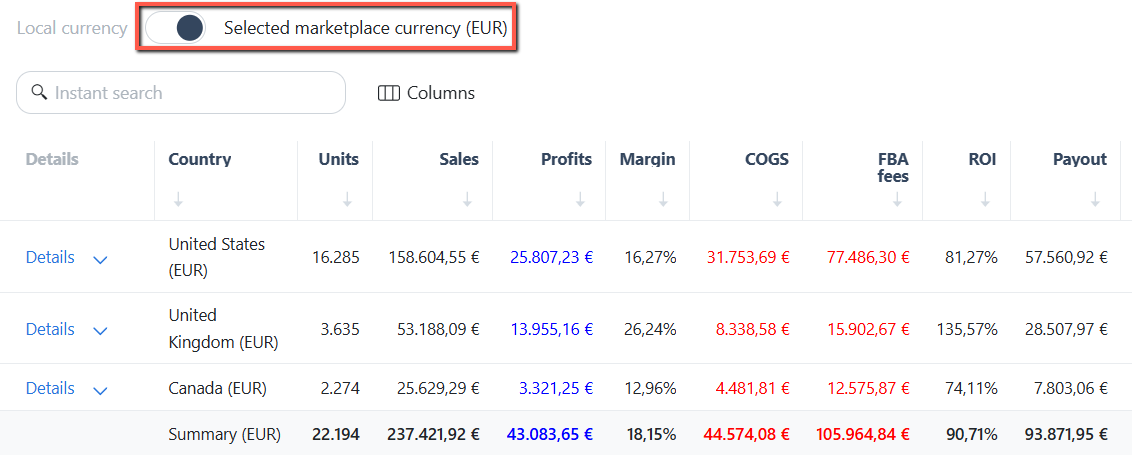
Regional Sales in the same currency
Convert key metrics like Sales, Profit, and COGS into your selected marketplace currency using the “ Selected Marketplace Currency ” toggle on the Regional Sales page. Check out the details in our March Release Note: Regional Sales: Added Marketplace Currency Converter
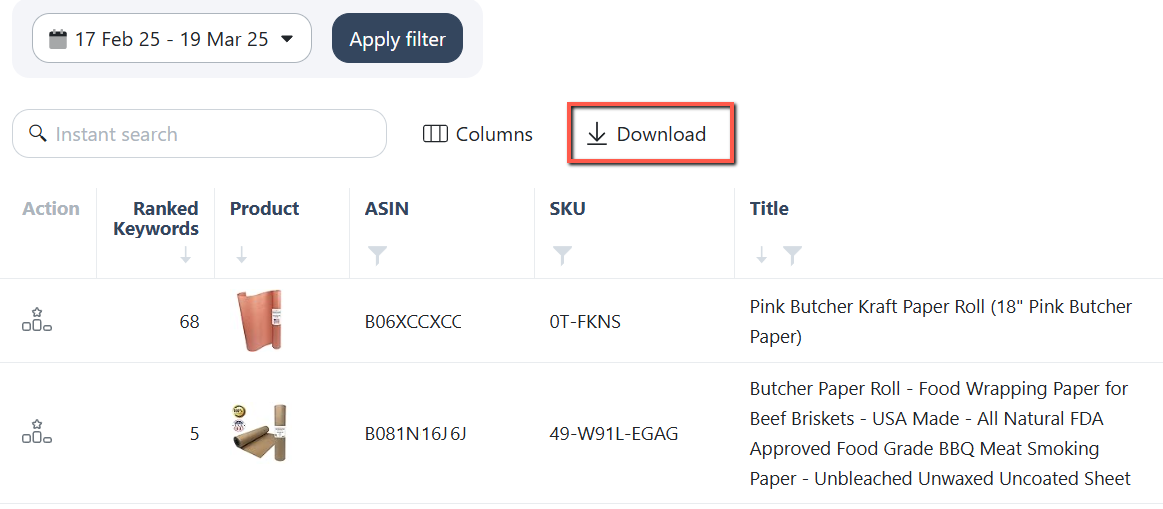
Export ranking data on ASIN level
You can now download ranking data for all ASINs at once by clicking the "Download" button on the Keyword Rank Tracker's main page. Read the details in our March Release Notes: Keyword Ranking: Enabled Exporting Keyword Rank data for all ASINs
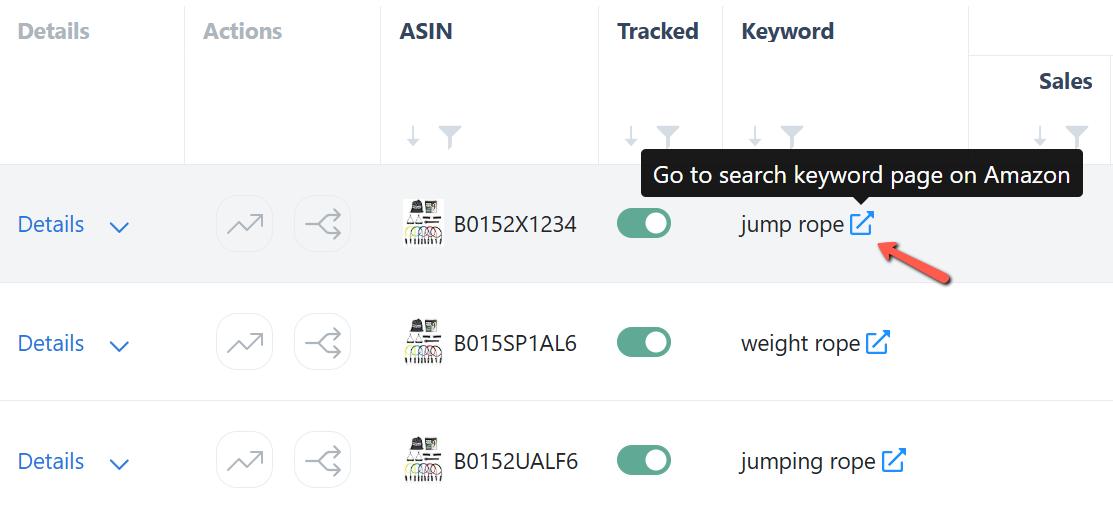
Rank Tracker: Link to keyword search results on Amazon
We’ve added a direct link to Amazon search results on the Keyword Ranking page. Click the icon next to any keyword to instantly open its Amazon results. Check out the details in our May Release Note: Keyword Ranking: Added Link to Amazon Search Result
Rank Tracker: Add keywords to be tracked directly from Ads Insights search terms page
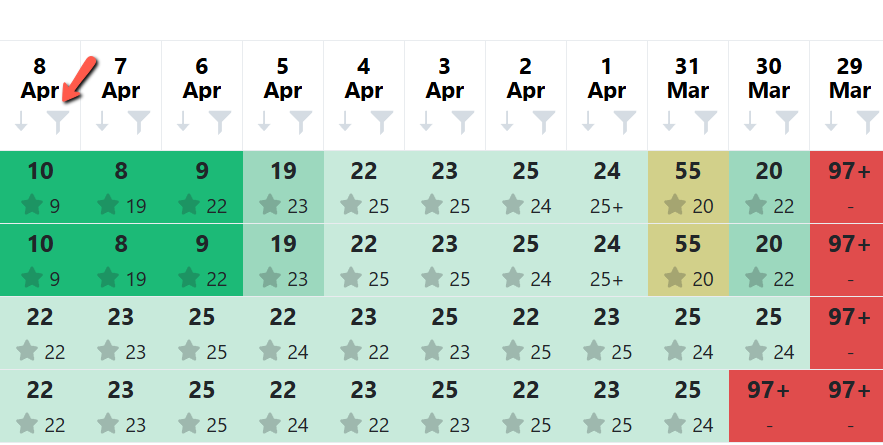
Rank Tracker: Sorting and filtering based on ranks
You can now sort and filter keyword rank data to easily identify keywords based on their organic ranking performance. Read the details from our April Release Note: Keyword Ranking: Added filter and sort button on the Keyword rank data
Add VAT for UK
It is annoying to have to enter VAT as a seperate cost because we change the price of products and forget to adjust the VAT so our data is incorrect. You could have this as a tick box option for each product in UK and all EU
Ability to pause duplicates on the Competing Keyword page
colonna della data nei search terms
It would be extremely useful if, on the “Search Terms” page within “Ads Insights,” there were a dedicated “Last Activity” column (with filtering options), similar to what we already have in the “Keywords” section under “Performance” in “Ads Insights.” Having that column would allow users to quickly view search terms from, for example, the past week that generated clicks but no sales. I personally created a filter to identify all search terms with at least 1 click and 0 orders, then I manually set all those that are not relevant to the product I’m analyzing as “negative exact.” If there were an option to filter by date, I could simply apply a filter to all terms that received clicks without orders, setting the start date from my last review. This would save a huge amount of time on all those manual negation tasks.
Add "Days of Inventory" to criteria
It's good being able to tweak ads based inventory levels, but with dozens of products, this becomes difficult to track and duplicates work when products sell through at different rates. Being able to increase/decrease pause/enable based on Days of Inventory, rather than just true inventory level, would make this significantly easier and save us hours! Thanks
Negate Search terms on Headline Search ads tab
Currently, there is no option to manually negate search terms under SB headline campaigns.
Portfolios Start Date change in Bulk everyday without changing existing budget Caps
So we have a daily portfolio budget that we have put and we manage it by changing start date everyday. Right now from SI we're not able to change start dates in bulk without changing budget as it is mandate field. Can you please add a way to do so, maybe keeping budget and date changes as seperate options. It'll be great if we can have that options as right now we go to the campaign manager and do it from there on a daily basis.
Collapse Objective Rules when filtering
Automation > Bidding Rule : Whenever I apply a filter in the Bidding Rule section, the rules under each object automatically expand. This makes it difficult to view all campaigns at a glance. It would be helpful to have a toggle or button to collapse/expand all rules easily. This would greatly improve navigation and usability. Thanks!
Consolidate SQP data on Parent level to make the SQP data even more actionable
Show the Placement Rule Criteria on the Change Log
More Performance Filter
I want more options for filter in Performance: - Active Status of campaigns, targets - Match Type, Campaign Type (SP,SB,SD)
Rank Tracker: Enable keyword tracking using bulk file
Support for KDP ads
Mass Campaigns: Ability to Add Negative Keywords & ASINs during mass campaign creation
Parent-Child ASIN evaluation: Add Sales and Spend % column for Child ASINs
I'd like to see this data for Parent-Child evaluation. One suggestion to add to the software. % total sales for each child ASIN % of ad spend for each child ASIN
View Refund Rate at Parent ASIN level
Zero Rated VAT on certain product
For our shop, some products attract 20% VAT, and some are 0% rated. How can we set product level overrides for VAT rate?
Ability to track keyword ranks(SP & Organic) on hourly basis and make bid changes based on it
If a keyword is fluctuating alot on SP rank, SI Keyword Ranking can track this and with automation rules. It can make changes in bids or placement modifier to keep appearing at specific position.
Manually harvest and add converting search terms to the existing campaigns within the system
Manually harvest and add search terms directly as new keywords to the existing campaigns within the system (Ads insights>Search terms)
Pause campaign if reach for stock level is low
I'm looking for a way to automatically pause campaigns when the existing stock only lasts for x days. I haven't found this option, even though you apparently have this data. The only option seems to be manually defining the stock level. However, this is impractical for me, as I have numerous SKUs with varying sales figures, and also some SKUs with very low stock levels because they are rarely purchased. Is this feature in development? I would greatly appreciate being able to use it.
Daily Visibility Insights Notification (Search Volume TOP10/50 Placement)
In other tools, you can set notifications on a daily basis, allowing you to see for each product how much keyword search volume is ranked in the top 50 or top 10 positions.
Add last manual change date and last auto change date to Keyword tab of Performance table.
I find that as I work on adjustment manually, I can forget if I did changes already to the target. Having these last change date on the same dashboard helps reduce the time required to look it up on Manual change history tab.
Bulk add asins to campaigns
bulk add asins to campaigns
and a "TOS IS" column in the keyword targeting strategic objective page
Add the TOS impression share data of the campaign as a new column in the Keyword Targeting Strategic objective when assigning an objective to a campaign, because in the bidding rule there is the option now to change the bid based on the TOS IS criteria, so that would be much more comfortable to change the objective next to the TOS IS data there
PPC Manager Mode: DayParting Master Override On/Off Button for Quick Adjustments - For Making Adjustments When DayParting is Usually Active (Quickly Overriding DayParting for 1-2 Hours for Adjustments/Monitoring/Checking Ads Manually).
This Master On/Off Switch allows users to disable DayParting temporarily to monitor or check ad positions on the other side of the world/outside US time zones when ads are typically paused overnight. It simplifies the adjustment process for DayParting Rules without making permanent changes, featuring a straightforward On/Off button for all rules in 'PPC Manager/Developer Mode'. This would be a temporary override button for DayParting rules, which is essential. Our current setup does not allow for manual edits to ads or the ability to check positions naturally. For instance, I reside in Asia and I sell in the US. When I try to go on Amazon to verify the position of the term "meat claws" on both desktop and mobile, I'm unable to do so due to the active DayParting rule while I'm awake in Thailand, resulting in my ads being inactive in the US since it's nighttime there. To manually adjust a bid and verify an ad's position, I am forced to tick every hour on the checkboxes for the DayParting rules to reactivate them. This process is cumbersome and disrupts the finely- tuned campaigns that have been established, introducing significant risks for potential mistakes. Each time I wish to adjust or check any sponsored ad position manually, this process is necessary, leaving no option for manual edits while DayParting rules are in effect. We need a simple override button or "developer mode" that temporarily bypasses all DayParting rules without requiring intricate changes to the established rule framework. This should simply function as an on/off switch for all DayParting rules. This would operate like a developer or PPC manager mode, allowing us to check our organic positions manually, particularly for keywords with high ad spend. There are always instances when bids must be manually checked and adjusted, especially with high traffic keywords with long analysis periods (i.e. 60-90 days). This is unattainable with the DayParting rules blocking visibility so I cannot do my work. We cannot override these settings without jeopardizing our entire strategy or causing other disruptions by manually editing rules every time we want to simply edit or check a bid. We face a significant risk every time we need to manually check or update an ad. This limitation hampers PPC management, as it forces us to solely depend on Scale Insights without the option for human intervention (we literally cannot see the ad on Amazon.com because of the DayParting rule, which we cannot switch off or reprogram safely without risks every time). We need the ability to override all of the DayParting rules temporarily for 1-2 hours while executing essential PPC monitoring and tasks, and then effortlessly switch back to the DayParting rules. This capability is crucial for effective manual PPC optimization and development work. Simply an On/Off override switch for all DayParting Rules ('PPC Manager Mode'). This means we do not have to take risks in making hard changes to carefully built DayParting rules, where the room for error is high.
Identify Top 20 bad trending sales campaigns
Okey, i need to check all the campaigns one by one to check the stats? I had hoped that there might be a dashboard or another view that would show me, for example, the top 20 campaigns that have made the most losses compared to previous months. In other words, a downward trend. The aim would be to quickly recognize where sales have fallen.
Multi-account login in current SI is a shame
It looks more like a shameful workaround and not like a real usable feature. Why can't SI devs simply copy multi-user login from other popular service like Helium 10 etc.? It's not a landing on Mars to be able to login with the same email into multiple client accounts
Filter by Custom Product Groups
I'd like to be able to add skus to a product group, so we can pre-select groups of ASINs when looking at PPC/sales stats, instead of having to manually add each asin in the group everytime you want to check the stats. Would be simple to do and save a lot of time.
Add product's review and ratings
I want to get my review and ratings for my product on a child asin is it something we already have or we can build upon ?
Rank Tracker: Show Amazon badges (e.g. Best Seller, Amazon's Choice) on rank tracker
Rank Tracker: Import search term impression share data
Daily Budget Rules on Sponsored Brands and Sponsored Display campaigns
I would like to request support for Daily Budget Rules on Sponsored Brands and Sponsored Display campaigns, similar to the functionality currently available for Sponsored Products campaigns. Being able to automate budget increases and decreases for Sponsored Brands and Sponsored Display would help advertisers better manage campaign performance during peak traffic periods, promotional events, and seasonal fluctuations without requiring manual budget adjustments. This feature would improve operational efficiency, provide greater budget control across all ad types, and help ensure Sponsored Brands campaigns remain competitive throughout the day. Thank you for considering this enhancement.
Automated Placement Modifier Changes
I would love a rule that can look at placement data by campaign and optimise towards certain metrics. e.g. +25% TOS% modifier and -20% bid if TOS has higher CVR and more sales than ROS.
Add SB saerch terms Data
Add SB saerch terms Data in under search term tab
Unterschiedliche Mehrwertsteuersätze
Bitte unterschiedliche Mehrwertsteuersätze zulassen. Beispiel Deutschland nur pauschal 19% auswählbar, es gibt aber auch Produkte mit reduzierten Steuersätzen wie zum Beispiel 7%.
Duplicate calculation of tracked keywords
Since we have several products that rank on the same keywords, it is of course difficult to see that we have to pay for each keyword individually. As we know, in the background, the Amazon page for the search term is fetched once, and all products visible on the first or second page are identified and stored. This means that if two products should be tracked with the same keyword, there is no double effort involved. Nevertheless, it is tough to also pay double for this price now. I would find it fair if tracking a keyword were paid for independently of the number of products being tracked since, as discussed, no additional effort arises.
Sort filter for New bids in Change logs
In change logs, as we can sort descending to ascending for various columns like Spend, ACOS, Adjustment. Please also add this for (From & To) new bid column as well. This way we can see what are the new bids for each target now in descending order incase need to revert.
Add CPC column in Automation tab
As we use automation tab to assign Strategic Objective. It's critical for us to know whether current CPC of campaigns to assign suitable Strategic Objective or Rules.
Save the page view of filtered products on the Main Dashboard and Sales section
Support Amazon Business data
Add Hide SB and Hide Archived campaigns in performance filters
Add criteria column on the Budget Rule Change log
Please can you add CRITERIA to the BUDGET Change Logs? Really difficult to understand which criteria was creating a change to the daily budget. Thank you.
Linked Ads with ASIN > Automatische Zuweisung
Eine Funktion, welche automatisch die eine ASIN zu Ads zuweist. Notwendig wenn mehrere ASIN's in einer Kampagne beworben werden. Es soll automatisch die ASIN zugewiesen werden mit den meisten Order.
Budget Rule: function to increase/decrease based on ACoS value
Suggestion: If the daily budget of a campaign xy is exhausted and a certain ACoS value is met, increase the budget by xx %. (this function is currently not available)
Add Comments to Campaigns/ Ad Groups/ Keywords
Adding comments on Automation or Insights pages to individual items would allow us to have a history of decision making/ allow a team to collaborate better on any changes made.
Rank Tracking including stats in analyse periods (days to analyse)
Problem: Currently, ranking data is not part of days to analyse or any other metric. Meaning, if I use days to analyse 30 days, it does not count for specific rules based on ads and organic rank. Idea: Looking at an average ranking across days to analyse. If ranking data is not available but bidding algorithm is about to be triggered, either use the average (see above) or delay bids adjustment when ranking data is available.
Connect data to BigQuery Google Cloud
We are currently working on integrating our Amazon Advertising data with BigQuery and would like to explore if it's possible to connect the data that you are pulling from our Amazon account directly to our BigQuery platform. This would help streamline our reporting and analysis processes.
API access
A direct API to pull your Scale Insights data into your own tools, dashboards and agents.
AI agent
An agent that does not just answer questions but takes the next step and acts on your account for you.
Save the view of filtered & sorted columns
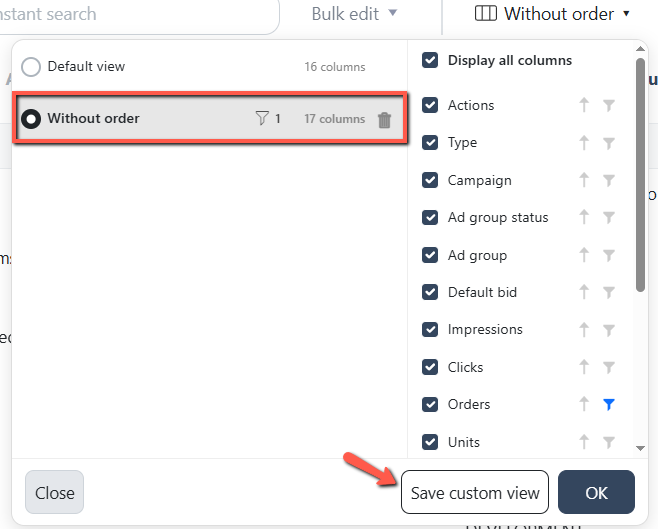
You can now save custom views on the Ads Insights Performance pages, so your preferred layout is always ready without needing to set it up again. Customize your view by: Showing or hiding columns to display the metrics that matter most Sorting items by your preferred column Filtering items by name or value Check the full update in our July Release Note: Ads Insights: Save Custom Views
having the automated rules as “suggestions” that you can confirm before they actually execute
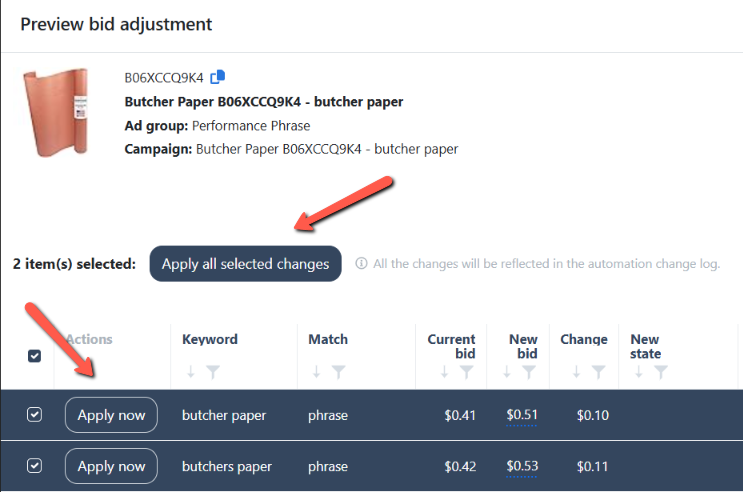
You can now manually run bidding rules directly from the Preview or Ad Group Preview pages, allowing you to instantly apply changes to selected or all ad groups without waiting for the next scheduled run. Check the full update in our November Release Note: Bidding Rule: Enabled Manual Rule Execution
Bulk Delete Function for Strategic Objectives
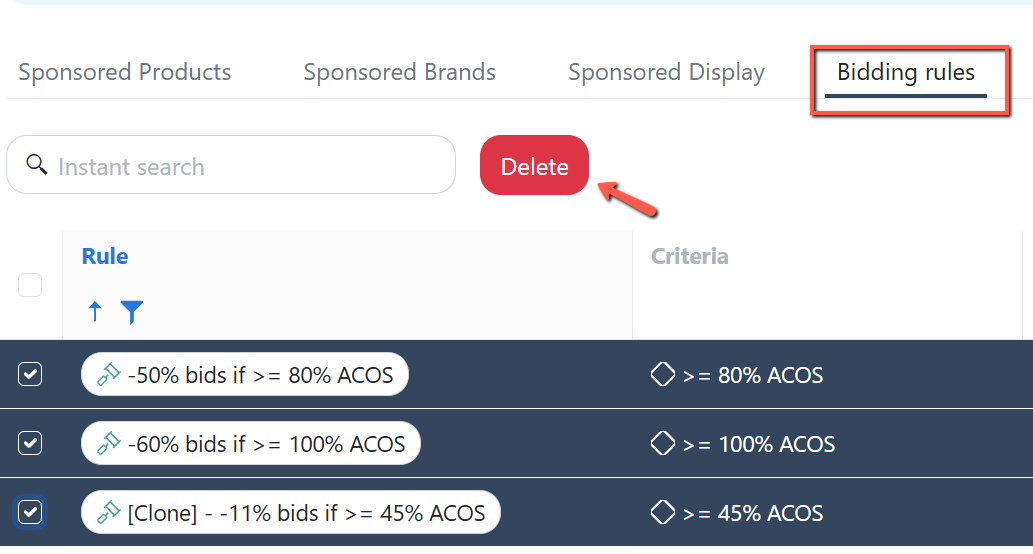
You can now easily delete multiple rules and Strategic Objectives at once by selecting them from their respective lists and clicking the "Delete" button. Read the details in our April Release Note: Automation: Bulk deletion of Rules and Strategic Objectives
Add Search Box on Preview pages
Could you make some sort of product search on the preview pages so we don't have to endlessly scroll to find our bid adjustments?
View Manual Bid Changes on Sales Trend
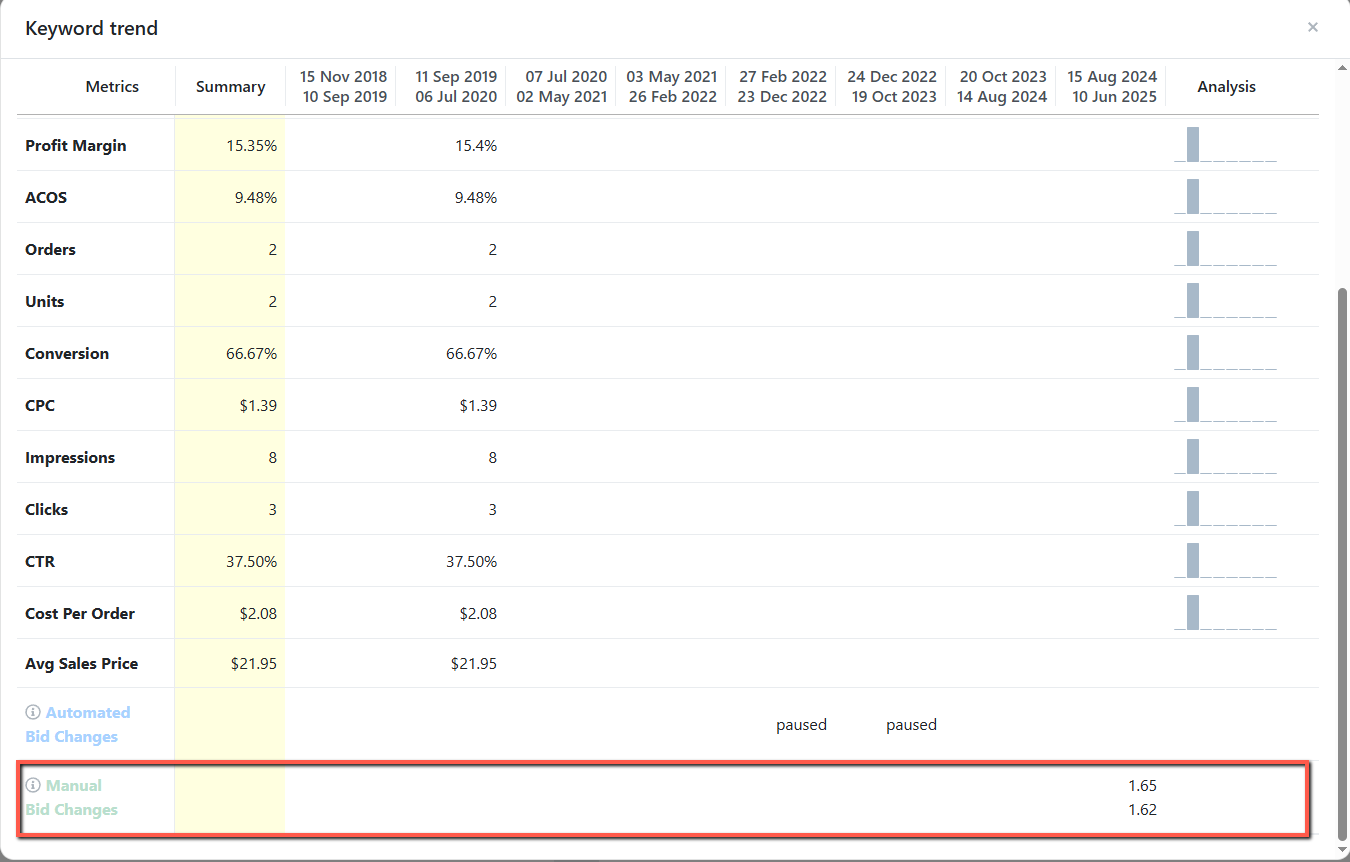
Ads Insights Keyword Performance now records manual bid changes made to your keywords. Check the full update in our June Release Note: Ads Insights: Included Manual Bid Change history on the Keyword Trend table
Rank Tracker: View product OOS status
You'll now see a product status indicator on the Keyword Ranking page that highlights when a product is out of stock. Check out the details in our February Release Note: Keyword Ranking: Added Out-Of-Stock indicator on products
Exclude VAT from “Sales” in Dashboard + Regional Sales charts when “Enable VAT Calculation” is ON
When Enable VAT Calculation is turned on, the Sales column in the Dashboard and Regional Sales charts still appears to include VAT. At the same time, TACoS and Margin now exclude VAT. This mismatch creates confusion and reporting errors for UK/EU performance: when we export the data, Sales doesn’t reconcile with TACoS/Margin unless we manually remove VAT (and that only happens if someone remembers to do it). Requested change (preferred): • When "Enable VAT Calculation" is turned ON, display Sales excluding VAT (so Sales aligns with TACoS and Margin). Alternative (acceptable): • If Sales must remain VAT-inclusive in these charts, then add a VAT column to the Dashboard and Regional Sales charts so we can quickly back out VAT without extra manual steps. Why this matters: • Reduces manual work and spreadsheet adjustments • Prevents internal confusion and inconsistent reporting • Makes exported data immediately usable and consistent across metrics
Link ads with ASINs > Add Portfolio as Column
Helps to identify certain campaigns quicker
Add a warning notification whenever a very high bid is set when doing a bulk increase on bids
Add a feature (or one can be enabled) that provides a warning notification whenever very high bids are set when doing bulk increase on bids. This would help prevent accidental overspending and keep campaigns more controlled.
Ranking Data at Child ASIN Level
Hey Team, Currently, scale insights provide ranking details at Parent ASIN level. Since we know Amazon has recently changed how listings appear on SERP and now multiple ASINs belonging to the same parent can have their own ranking, it would be really helpful if Scale Insights can provide Ranking at child ASIN level so ranking automation campaigns can be built for each child differently. Please let me know if this clearly explains the requirement and if you have any questions for me. Thanks! Affan
Ads Insights: Add an option to set the bids to match the CPC
The bulk changes can only be made from current bid, it would be handy to be able to select good performing kws and match the CPC that converted, rather than increasing or decreasing based on the current bid (that could be way lower or higher due to past optimisations)
Brand Keywords Blacklist/Whitelist
Brand Keywords Blacklist: Allow users to create a Brand Blacklist containing all brand-related keywords and ASINs. When setting up campaigns (e.g., FMC or others), users can apply this blacklist to automatically exclude all brand-related keywords and ASINs, ensuring the campaign targets only non-brand search terms. Automatic ASIN Updates: When new ASINs are added to the account, they should automatically be added to the Brand Blacklist and excluded from all non-brand campaigns using the Brand Blacklist. Brand Whitelist: Enable a Brand Whitelist feature that lets users create campaigns targeting only brand-related keywords. When importing keywords from other campaigns, the whitelist should filter and include only those containing the brand name. The Challenge: Currently, to target non-brand search terms in FMC campaigns, users must manually negate brand-related keywords and ASINs in each campaign individually, which is very time-consuming especially with big portfolios.
Automation: Add column filter for "Unlinked" ASIN status
Import Rule: Ability to remove or exclude keywords from the preview before the execution period
Add Placement Adjustment Final bid to Keyword's tab under Performance
The columns to add are: Placements % value for Sponsored Products Campaign , 0 if Sponsored Brands The final bid after placement adjustment So for example, If say, a target has a current bid $0.50 The extra columns would show - Top of Search placement value % : 100% Final Bid for Top of Search Placement : $1.00 Rest of Search value % : 50% Final bid for Rest of Search: $$0.75 Product Pages Placement value % : 0% Final bid for Product Pages: $0.50
Ads Insights: Allow the "Search bar" to look into the "inside table" data and filter results
Bidding and Negative Rules for Sponsored Brands - Manual Campaign but target is Auto or match type is "THEME"
Sponsored Brands - Manual Campaign, but the target is Auto or match type is "THEME". Kind of automatic where Amazon shows ads for keywords related to the landing page. These campaigns are visible in Sponsored Brands section in bidding rule but bidding rules doesn't work, it does not increase/decrease the bid.
List of things to improve to be a next level too for PPC Specialists
Here's my list of issues, that if they would be solved, SI would be my best PPC tool: Can't see the change amount/% of each KPIs for current period vs previous. After filtering the portfolio, and try to filter campaigns after this, I see not only the campaigns from the filtered portfolio "Performance" section If I select to go to a campaign I can't go to the set of placements for it. If I changed the period of data in "keywords" I need to reaply filters. Filters need to be prioritized above selected the data range. When I try to create a preset of filters, I can't create it by portofolio/name etc., only strictly based on KPIs. When I filtered down some set of targets, I can't download them. Can't exclude from the display of search terms, the ones that are already negated. In Search Terms tab there's no total for the KPIs. Can't enter a list of KWs as a filter. Can't analyze and optimize the placements for SB campaigns. Can't really set up the automation for placements based on my legend (if any of the placement is hitting sertain KPIs, to increse or decrease by a certain % without setting target KPI and mandatory selecting a specific placement
Export Suggested Bid
would be nice to export the suggested bids for all of the keywords we have so we can evaluate our current bid vs our suggested bid.
Purchased Product Report
I want that SI can add the Purchased Product Report for SP, SB, SD into the Performance that i can use it for check other product conversion of asins
Search Terms page: Ability to manually add keywords on the ad group's negative phrase list
Add a condition based on the relative differences in ACoS and click share between placements
add the option to create a rule at the placement level based on relative differences in ACoS and click share
Enable assigning different VAT rates for product sale and Recoverable VAT on FBA fees
Global View Dashboard
Have a global (all marketplaces combined) view of stats dashboard - it can be exactly the same as the current marketplace ones, just consolidate the information. Viewing ACOS, TACOS etc. on a global level gives a quick check to ensure everything is on track. It shows the complete view/ impact of scales insights changes we're implementing across whole amazon footprint.
Allow option to chose 15 days, 30 days, and 60 days search term data when creating Mass Single Keyword Campaigns.
Fully automate the creation of Single Keyword Campaigns (SKC) based on keywords harvested from Broad or Auto campaigns
Run the split process automatically on a recurring basis (e.g. every 14 days) without manual action, or add scheduling for SKC.
Placement Rule: Add Campaign TOS Impression Share as Criteria
Add Search Terms as a Negative Exact/Phrase within Ads Insights
This request applies to the Insights Overview and Search Term tabs within Ads Insight. Please consider adding the option to add/remove the search terms as a negative exact/phrase to their respective Ad Groups, directly within the row they were viewed from. Additionally, an indicator showing if the term is currently negated would help. If a search term found inside Ads insight needs to be negated, you typically would need to do so one by one inside Campaign Manager. It would be a multi-step process since you would need to filter the campaign and ad group for each and every term. The ability to just negate (and/or undo negation) directly inside Ads Insights would save the user a lot of time. Although the goal of using scale insights is automation, items such as negation is typically a delicate matter. Once a search term is negated, the decision is often indefinite. Many times, a manual review and human intervention is needed to avoid unwanted negation. This feature would cater to those like me that rarely use the “Negative Rule” automation and instead opt to review under performing search terms manually within Ads Insight. Please let me know if you need more details. Thank you for your consideration!
Optional Total Row for Search Terms
Appreciate the new Search terms aggregate report. It would be very beneficial if you could provide an optional show Total at the end of the table to allow quick understand, as a whole, how well is the search term performing across different child ASINs.
Keyword Ranking: Adding Average Value Last 7-14 Days
Example attached -> would be really helpful to identify trends easily
Gebote automatisch setzen abhängig vom Produktpreis
Die Gebote für die targetings sollen automatisch gesetzt werden. Das Gebot soll errechnet werden vom Produktpreis. Der Advertiser gibt lediglich eine Prozentwert an. Beispiel: Produktpreis ist 30 US-Dollar und du legst für alle deine Kampagnen Gebote einen Prozentwert von 2 % an. Das heißt die Gebote werden auf 60 Cent gesetzt. Ziel: Die Funktion soll helfen schnell Kampagnen anzulegen mit einem Bidding einen wirtschaftlichen Sinn macht.
"Combo Deal" for Scale Plan and Keyword Trackin Plan
As a customer, would love to see some kind of "combo deal", for our normal Scale Insights subscription and the Keyword Tracking Subscription. Make it super easy to manage.
Suggestion for Enhancing the UI Design of Your PPC Tool
Hello, I am a recent subscriber to your PPC tool and, so far, I am very satisfied with its functionality. However, I would like to offer a suggestion for an important improvement, if possible, regarding the tool’s user interface. I recently had the opportunity to experience the PPC tool from Xmars, and I was truly impressed with its design and usability. I believe that incorporating a similar aesthetic into your tool could greatly enhance the user experience. The sleek and intuitive UI of Xmars made the tool even more enjoyable and efficient to use. If the interface of your tool could be updated or redesigned to align with this approach, I’m confident it would further elevate the overall user experience. Thank you for considering my feedback. I look forward to seeing how Scale Insight continues to evolve, and I remain excited about the potential improvements you may introduce. Best regards, Franco
Rank Tracker: Add note/labels column on rank tracking page
scheduled exports
automated export of spreadsheets for change logs, and keyword performance. to be able to see which rules are doing good or bad.
Undo option
Add Undo bidding rule option from change log. I'd like to try out new rules, so I'd like to be able to bulk undo bid changes from the change log
Permanently hide Archived campaigns in SI
Add negative rule automations to Sponsored Brand campaigns
Pause/Enable Campaigns from Keywords page
It would be convenient if we could pause & enable campaigns from the keyword page, instead of needing to switch to the campaign page.
fully automated, calendar-triggered seasonal feature
software should pick up which keywords are seasonal and adjust bids accordingly
Multiselect bids on the change log for reverse bids in mass
SB Theme data
It will be great if you add SB theme campaigns data under perforamnce keyword tab.
Support AMS ad console
it will great if you have the option to connect also AMS ad console ( it's the same ad types like in the SC )
Accounting for UAE VAT in Scale Insights
a custom field for manual adjustments within the software to manually apply a percentage adjustment, such as the 5% UAE VAT, to Amazon fees or advertising costs
Decrease the annoying delay when hovering over the sidebar menu
The delay when we hover over the sidebar menu icons is annoying and unnecessary. It makes the site feel slow and unresponsive and adds frustration when we want to navigate somewhere. (No other aspect of the UX is slow and unresponsive like this). Please consider drastically cutting the delay here.
Add Recommended Bids in Performance>Keywords tab
It'd be nice to get recommended bids column/option also for the targets in this tab. So no one has to look inside campaign manager and make changes directly from SI
Add "exact 1:1" search to the search terms bar on Ads Insights
I'd love to be able to only see in results the search terms that exactly match 1:1 what I'm looking. That would save me some time scrolling through dozens of pages. Let's say I'm looking for an specific search term, in this case 'Toilet paper', as you can see in the screenshots I'm getting every phrase that contains these words Thanks!
Enable the "Sort" function on the column filter of bulk template files
Save view on the Sales Trend page. Sometimes I want to see minimal data instead of all 28 metrics.
Add Bid Change calculation in Change logs as it is in Preview Changes
Convenient to check new bid calculation for changes that have been made. And if there are any anomalies. Easy to adjust.
Status Rule: "Pause" Childs / SKU within a campaign based on performance
At the moment we can use filters to identify "products" with a higher ACoS or just clicks and no sales easily but you always need to go to Ad Console and check all campaigns (being displayed based on the filter in SI) manually. Two Options: 1) Pause them directly within SI (Action button or something) 2)Automation: Create Status Rule for Childs (similar to other Performance Rules)
Add position distribution
Like DataRova Beta function that allows us to see position distribution across all keywords, allowing us to see trend. We can take actions when trend breaks
Margin % Excluding Refunds - Add to Dashboard and Sales Columns
We need to be able to see how PPC and Promotions impact our margins regardless of refunds. In seasonal businesses, refunds can come in higher at different times of the year, which can skew the data.
Search terms save custom filters
I'd like the option to have more than the 3 pre stablished filters inside the search terms tab, this way I can make different filters like search terms with spend over 15 and no sale, other for spend over 25 and inmaginable custom filters
Bidding Rule: Assign different Excluded Dates per rule
Sales & Inventory forecasting
We do see trend but a better understanding of a ballpark forecasting model for inventory and sales would be great. This way any seller have an base level idea of what to expect from investment to operation level.
Rank Tracker: Ability to negate keywords from rank tracking page
Sponsored Brands Auto Campaigns bidding and. negative rules
Sponsored Brands - Automatic but has manual keyword targets, are not available in Scale Insights. These campaigns are not visible in the Sponsored Brands section. Please add them as well as in Negative Rules
Daily Budget Rule Increase - Fixed Amount
Please add a feature to increase the daily budget rule by a fixed amount rather than as a percentage, since each campaign has a different budget. 10% of a budget of 100 is 10, but 10% of a budget of 1000 is 100, which is a very big difference.
Notifications - Flexible
I would like to suggest a flexible, rule-based notification system—similar to how bidding automation works with criteria and rules. For example: If the whole account has a TACoS above 15% in the last 14 days, send an email and trigger alerts. This way, if we’re managing 5–8 marketplaces, we can immediately see which ones to prioritize. The same logic can apply to products: if a parent ASIN (e.g., B0XYZ) exceeds the TACoS threshold, send an email and notifications. If the dev team can implement this, it would be great. We can also compare week-over-week data (for weekly reports) and, if sales decline WoW, send email and notifications. Email is flexible because we can forward these alerts to dedicated Slack channels for each brand account. Thank you so much.
Add Top 10 Competitor in SQP Report
We suggest implementing the following enhancement in the SQP report of Scale Insights: When a user clicks on a specific keyword under SQP, please display the corresponding Top 10 competitor ASINs data — similar to how it works in Seller Central’s SQP → ASIN View. Additionally, please add a CTR (Click-Through Rate) column in the Top 10 table, so users can easily compare ASIN’s click/Impression performance against top 10 competitors under the same keyword. This would centralize analysis in one place, eliminate the need to manually check Seller Central, and significantly improve workflow efficiency and strategic insights.
Add Middle East Region (Amazon.ae, Amazon.sa) to Account
These marketplaces are missing from ScaleInsights account management options. Please add them so we can use Scale Insights across all our marketplaces. These markets include UAE, Saudi Arabia (Mena area) and Turkey (technically in European area).
Data Missing for Auto campaign with Multiple ASINs in the Search term tab
Data is not generated for those campaigns with multiple ASINs in the search term tab.
Negate keywords from the Keywords Performance page
It's better to negate keywords from this page if I want to negate a keyword in a specific campaign that is not performing well, where that same keyword is doing well in another campaign.
A rule to adjust budgets based on the KW rank position
Strategic Objectives: Status Filter
Pretty hard to go through the entire catalogue if you have many campaigns and ASINs. Would like to have a filter option to identify inactive ASINs easily without wasting time.
Ads Insights: One dashboard for bid and placement changes + set desired ACOS
Please implement an optimisation tab under Ad's Insights -> Performance. This will allow to optimise every campaign properly IN 1 VIEW without opening separate windows to to analyse / change. This would have absolutely amazing impact to PPC optimisation.
COGS history log
Show history of changes in COGS
Repeat Customers
It is so easy to collect the tag of a repeat customer. FeedbackWhiz does it. Would be great to have a place where we can check the existing customers by month vs NTB customers.
Ads Insights: Create a streamlined flow through Campaigns, Ad Groups, Keywords, and Placements
Simplified overview in Rank Tracker that displays all tracked products and their ranks for the top 5 keywords
My suggestion is to show the tracked keywords when hovering over the rank numbers with the mouse. For example, the top 5 keywords could be represented as column headers (1-5), with each product and its respective ranks listed below in rows. This setup would make it much easier to track ranks at a glance, without having to manually check each product. Ideally, the data would also be downloadable for further analysis. I’m building a Google Sheet to monitor weekly metrics like ACOS, TACOS, margins, etc., and it would be incredibly helpful to include keyword rankings in the same sheet in a clear, organized way. I’ve attached a screenshot illustrating my idea.
Remove archived keywords from ads insights page
in the Ads insights page: https://portal.scaleinsights.com/Ads/Insights there is the section of "Keywords with High ACOS" which is showing me Keywords and not aggregated search terms. and it shows me there data of archived keywords... so there is nothing I can do about it - I suggest that your tool won't show them at all
Rank Tracker: View competitor ASIN positions on tracked keywords
Enable Negative Word for SB video keywords
The Negative Word Rule is now available for Sponsored Brands Video Keywords campaigns. This enhancement automatically negates irrelevant single-word search terms that trigger your ads, helping minimize wasted ad spend. Read the details in our September Release Note: Negative Word Rule: Enabled for the Sponsored Brands Video Keywords campaigns
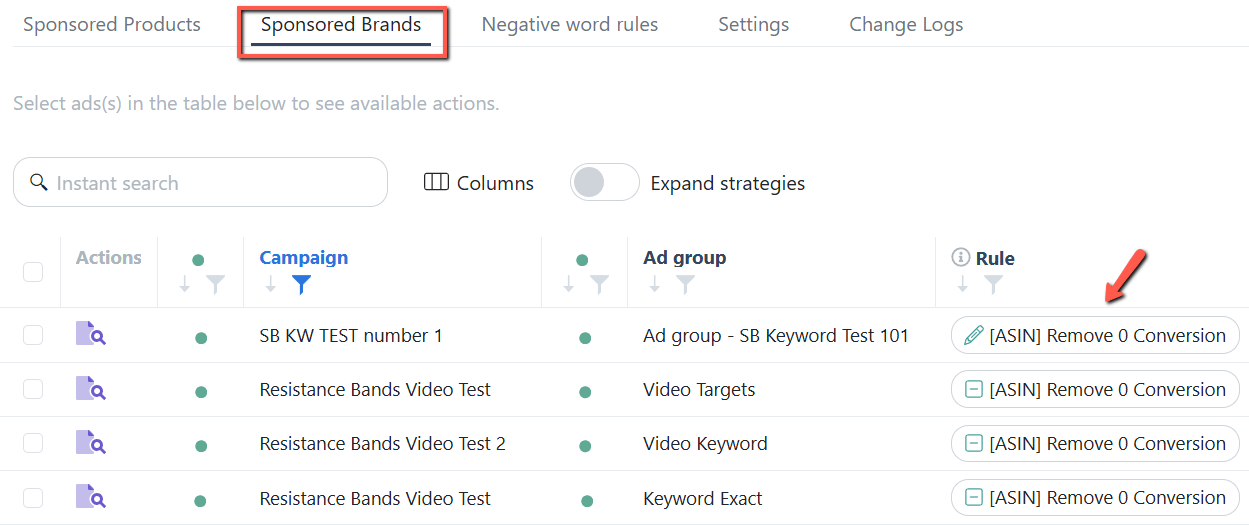
Enable blacklist for SB video keywords
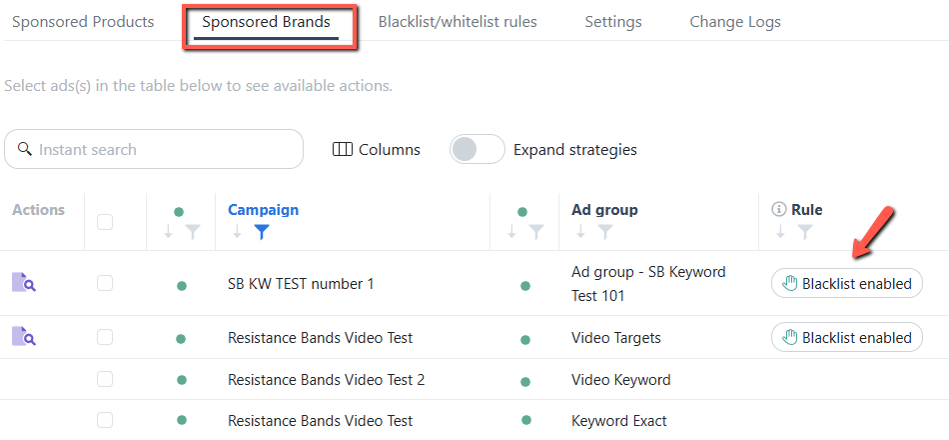
The Blacklist/Whitelist Rule is now available for Sponsored Brands Video Keywords campaigns. When enabled at the Ad Group level, all keywords or product targets in the list will automatically be applied as negative targets within that Ad Group. Read the details from our September Release Note: Blacklist/Whitelist Rule: Enabled for Sponsored Brands Video Keywords campaigns
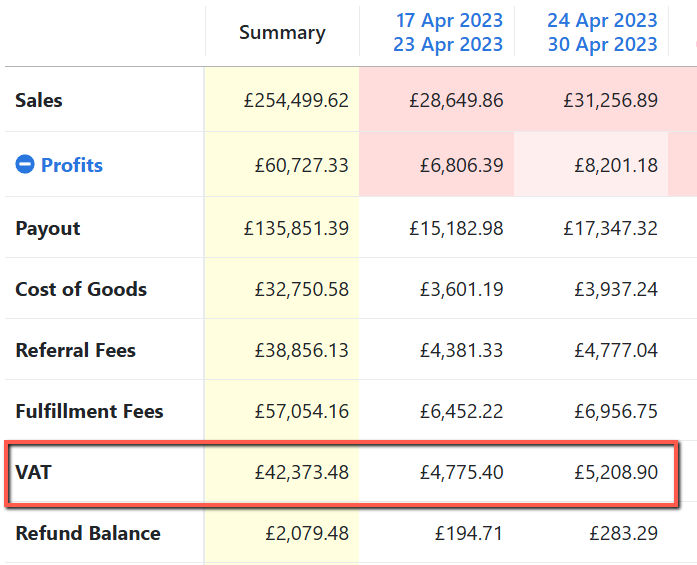
Sales Trend: Show VAT under Profits when VAT calculation is enabled
We’ve added VAT to the Profit breakdown on the Sales Trend page. When VAT is enabled in the Products' VAT page, the table will now display the actual VAT amount. Check the full update in our August Release Note: Sales Trend: Displayed the VAT value on the Profit breakdown
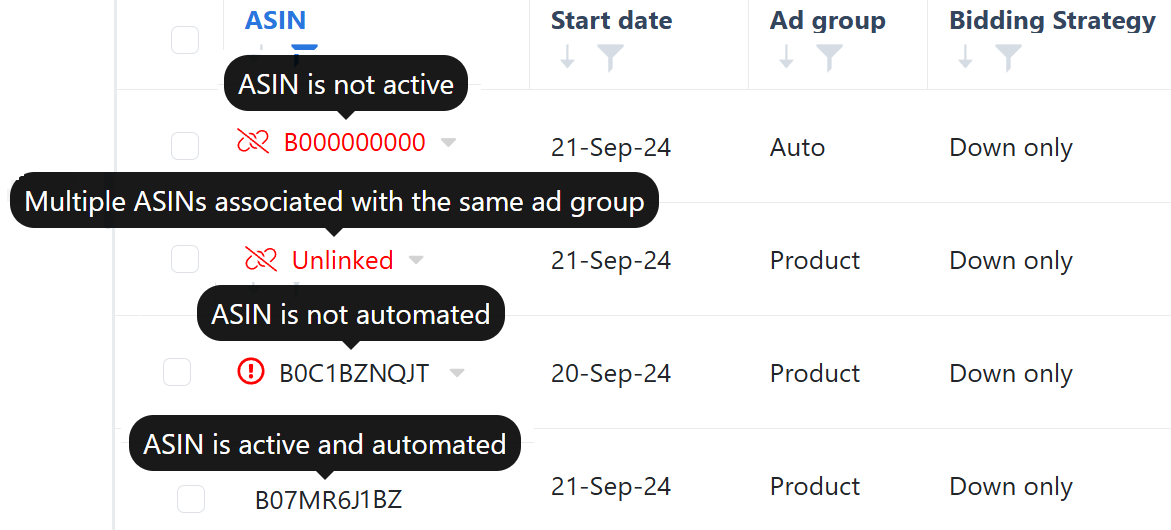
Bidding Rule - Identify all inactive ASINs at once
When you hover over an ASIN, you'll see a tooltip that indicates its current status. This enhancement applies to all rule pages. Read the details from our January Release Note: Automation: Enhanced ASIN tooltips
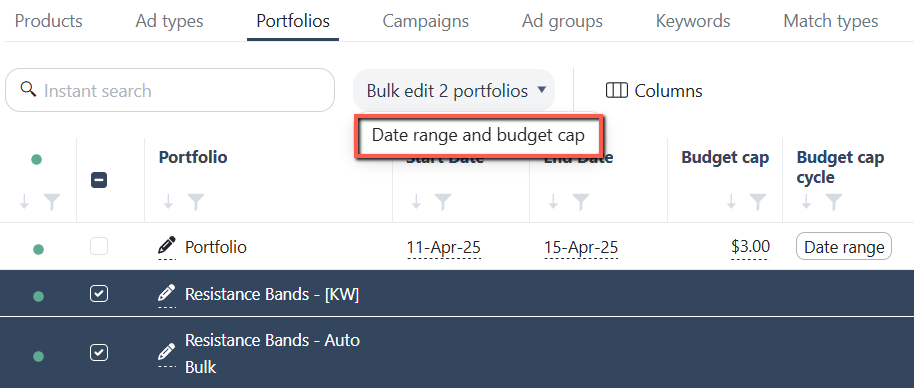
Portfolio budget and dates bulk edits
You can now manually update portfolio details directly on the Ads Insights Portfolio page. This feature lets you edit the portfolio name, budget cap, start and end dates, and budget cap cycle. View the full update in our April Release Note: Ads Insights: Portfolio Modification
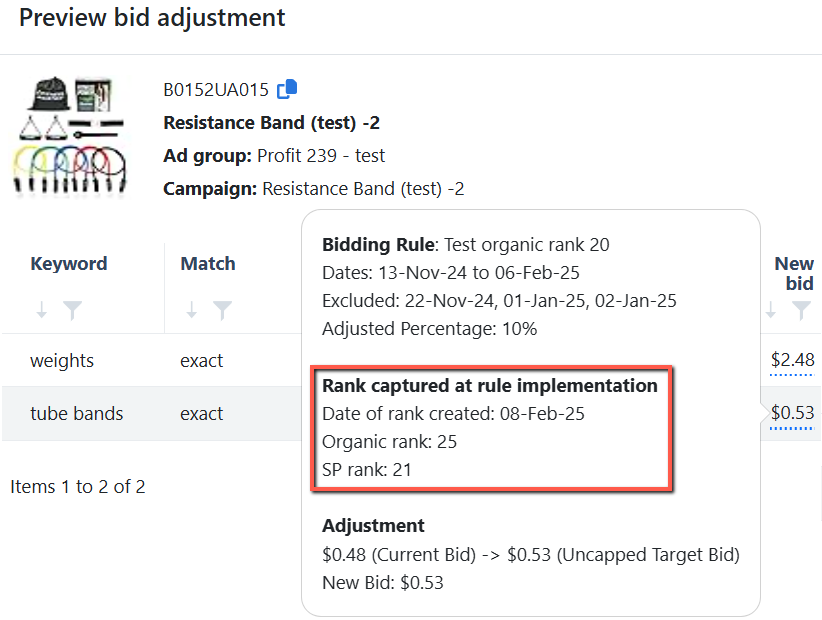
Add ranking data on the Change log page
We've now integrated the ranking data used by the bidding rule when organic and ad ranking conditions are applied. Check out the details in our February Release Note: Automation: Added Organic & Sponsored Product ranking data into bid calculations
Rank Tracker: View aggregated campaign stats on tracked keywords
Dynamic ASIN pricing adjustments
Tracking / Filter Option / still buggy
Does not matter what I do, "has value" or "≥" it seems to be buggy. Would be nice if somebody will have a look at the filter options wherever filter are being used
Ability to automatically apply rules to every campaign created
is there an ability to automatically apply rules to every campaign created? or have a rule to apply certain rules if the campaign name is xyz? i have alot of campaigns, they all need certain rules like dayparting etc, it would be great to not have to worry about this not being added
Stock Forecast FBA Pan EU
Hello, please add a way to see the FBA stock indipendently from the marketplace, I mean we are a PAN EU seller, so we don t really care where the goods are stored by amazon, we have only one 3PM logistic so we need to have a general overview and not a country one. Thanks
Ads Insights / Performance / Keywords -> Filter Option: Ignore Last Day
Either have a predefined filter (time period) or being able to create a filter including a option to ignore last xy days.
Subtotal filter report
The current filter report subtotal does not reflect the filtered data, would be useful to have the subtotal within the filter reflect that
brand orders broken
brand ads show orders.. but no units.. thus.. p&l is broken
Main Word page: Have the option to enable blacklist/whitelist of words & ASINs in bulk
Massen Erstellung von Strategien
Momentan können die Strategien per Bulk (Excel) massenweise bearbeitet bzw. an Kampagnen zugewiesen werden. Es wäre perfekt hier die Möglichkeit zu schaffen, um massenweise Strategien erstellen zu können. Für Bidding Rules gibt es bereits die Möglichkeit massenweise zu erstellen.
Automated COGS import
We need a solution fo an automated COGS import
AND / OR Condition Grouping for Bidding Rules
We would like to suggest adding AND / OR condition grouping to bidding rules. Many real bidding strategies require logic such as: (A AND B) OR (C AND D) Currently, if this type of logic is not supported, we need to create multiple separate rules and use Priority to control the execution order. This makes the rule setup more complicated and increases the chance of conflicts between rules. If you could support AND / OR condition grouping, users would be able to build more accurate bidding logic directly inside one rule, instead of relying heavily on Priority to simulate the logic!
Custom Seasonal Analysis Period
Allow users to select a specific historical period for analysis. We have some seasonal products, and this makes it difficult to set up automation rules effectively. For example: Halloween, Christmas, summer outdoor products, back-to-school season, winter products, etc. The performance of these products during regular months can be very different from their performance during peak seasons. This may cause several issues: 1. The system cannot automatically adjust bids based on keyword / target performance from last year’s peak season. 2. For seasonal products, we would need to manually review a large amount of historical data before the peak season. 3. The system cannot run automation based on a specific historical period, such as last year’s October 1–October 31 (Halloween) , or last year’s Q4, etc.
Automation Health Dashboard
The current Automation Dashboard does an good job of showing automation savings, actions performed and time saved. However I believe it could become even more valuable by adding an Automation Health section that helps users quickly identify issues requiring attention. I often come across the following issues when auditing new accounts. In many cases these issues are unintentionally created by us while optimizing the account. I've categorized them into two groups: Warnings and Alarms. 🟡 Warnings: Warnings are issues that require attention and may lead to problems in the future if left unresolved 1) Paused campaigns are not linked (affects data collection) 2) Active campaigns have no active advertised ASIN (creates dummy campaigns and clutters Campaign Manager) 3) Active campaigns have no active targets (creates dummy campaigns and clutters Campaign Manager) 4) Active campaigns have received zero impressions in the last 7 days (may require bid adjustments or further investigation) 5) Products are out of stock or nearing out of stock, but campaigns remain active (requires updating the linked ASIN or pausing campaigns in a timely manner) 🔴 Alarms: Alarms are critical issues that require immediate action because they can significantly impact automation or PPC performance. 1) Active campaigns are not linked (affects automation and data collection) 2) Active campaigns have no automation assigned (may have been missed during setup, especially Sponsored Brands campaigns) 3) The linked ASIN is inactive (requires updating the linked ASIN to restore automation) 4) Active Discovery campaigns have no Negative Rule assigned (Auto, Broad & Phrase) (may result in wasted ad spend on irrelevant search terms) Why this would be valuable As accounts grow to hundreds or even thousands of campaigns, manually identifying these issues becomes difficult. An Automation Health Dashboard would help users: 1) Quickly identify automation gaps 2) Prevent wasted ad spend 3) Ensure every active campaign is properly managed 4) Catch configuration issues before they impact performance 5) Spend less time auditing accounts manually out of SI I've also created a simple UI concept (attached) showing how this could fit naturally into the existing Automation Dashboard without adding complexity. I believe this would be especially useful for PPC agencies and sellers managing big accounts.
Revisit: Automated Review Request
Related request: https://roadmap.scaleinsights.com/archived/p/automation-for-review-requests This is a request to reconsider the previously archived feature for automating Amazon's review request process directly within Scale Insights. Use Case: Amazon sellers are currently managing review requests manually through Seller Central or paying for a separate tool (e.g., Helium 10, Jungle Scout, SellerBoard) just to automate this one workflow. Since Scale Insights already has deep SP-API integration with seller accounts, the infrastructure to support the Amazon Solicitations API should be largely in place. A built-in review request automation would allow sellers to trigger review requests automatically based on order eligibility windows, without ever leaving the platform. Why Build This: Reviews directly impact PPC performance. Higher review counts improve conversion rates, lowering ACoS and making ad spend more efficient. Since Scale Insights is already optimizing the ad side of the equation, adding review automation closes the loop by helping improve the organic performance metrics that PPC depends on. It also reduces tool fragmentation for sellers, strengthening Scale Insights' value as an all-in-one growth platform rather than a standalone PPC tool. Revisiting this now makes sense given how tightly reviews and ad performance are connected in the current Amazon ecosystem.
ASIN target Exclusion for Product Targeting Import Rules
Currently, the Exclude Phrase list in the Import Rule only works for keyword search terms. There is no equivalent filter for ASIN product targets. Users with ASIN-targeting campaigns (e.g., competitor and branded ASIN campaigns) need the ability to exclude specific ASINs from being imported, similar to how phrases are excluded in keyword-based import rules. Use Case: Exclude own ASINs from a Competitor ASIN Campaign Restrict imports to own ASINs only in a Branded ASIN Campaign
Download .csv for AdInsights Trends
Improve Product ROI/Margin Tracking
Right now production cost is a single box, without the ability to split it into production, freight and tariffs. All 3 of those numbers change independently and are accounted for separately. It would make life much easier if SI wasn't the only place we had to track costs differently, especially given how important a tool it is for our overall data tracking.
Excluding brand‑related phrases
automation should exclude keywords that have the brand name part of it
Feature Request: Chinese (Traditional/Simplified) Interface Support Global Chinese Sellers
We find Scale Insights to be an incredibly powerful tool for Amazon PPC automation. However, to scale our operations and improve team efficiency, we would like to request a Chinese language interface. Key Reasons: Operational Efficiency: Managing complex algorithms and technical bidding rules is high-risk. A native language interface would significantly reduce the risk of human error during setup. Team Scaling: It is much easier for our broader operations team to adopt and master the platform if the interface is available in their primary language. Market Potential: There is a massive community of high-volume Chinese-speaking Amazon sellers (from China, Hong Kong, Taiwan and beyond) who would prioritize Scale Insights over competitors if a localized version existed. We love your platform's logic and would love to see it become more accessible to the Chinese-speaking market. Thank you!
Add Inventory Level to the "Keyword Ranking" Page
Would be great to be able to add an inventory level, inventory days on hand to the "Keyword Ranking" page.
ACOS and CVR
It would be great to see on the dayparting the ACOS and CVR on an hourly basis. If we can include impressions and sales, it would be a great help. Also, there should be a filter per campaign so we know each campaign's performance.
Show all asin in bulk file blacklist
I see that the bulk file of black list only show asins that have black list, the asin without the list are not appears. it's inconvenient because i need to update manually each asin black list.
Adding shortcut button to Placements
In Keyword ranking tool, we can check campaign and keyword performance by clicking Details > Keywords. Adjusting bid would be right only in half of the cases. Other half requires Placement adjustment. Now we have to copy campaign name , go to Placements , filter it there. Would be awesome if you can add a shortcut button taking us into placement and filtering to the right campaign right away. Considering we need to check every keyword / campaign placements before adjusting bids, it would save a ton of time. Thank you !
Can you please add campaign level data in placement rule's change logs
I’d like to suggest a few improvements to the Change Log and Placement Automation features. It would be great if the Change Log tab also showed campaign-level statistics along with placement data, so we can easily compare all the important metrics in one place. Also consider to rename the word "keyword" with "Placement" because Top of search, product pages and rest of search are the placements not the keyword and also remove ad group column (that doesn't make sense).
Campo Note
Aggiungere un campo Note accanto alle kw per inserire appunti sulle strategie che ad esempio sin stanno adottando
Save settings in Mass Campaign Creator
It would help a lot if we could save settings in Mass Campaign Creator, so that we can select a setting template for a certain campaign type in order to set up campaigns way faster than now
Enable Daily Budget rule for SB video keywords
In bidding rules, be able to add ASIN specific values.
Example: Max bid is set to $1. I would be able to type in an ASIN and then set the max bid to $1.50 for that ASIN while it remains $1 for the rest of the ASINs.
Ads Insights: Keep Instant Search and Bulk Edit fixed while scrolling to avoid scrolling back up
Enable own lookback on specific negative rules, similar to the bidding rule
Enable Adding Keywords Directly from Performance
It would be valuable to have the ability to add a search term directly as a keyword to an existing ad group that already includes the ASIN associated with that term. For example, when reviewing search terms in the Performance → Keywords → Details section, users should be able to select a search term and add it as a keyword to the relevant ad group — specifically the one already advertising the linked ASIN. This would help maintain ASIN-to-keyword consistency and simplify campaign optimization.
Add Parent to Tags
https://portal.scaleinsights.com/Sales/Tag
Current Bid vs CPC Cross-field Filter (Including Modifiers)
Add a filter that compares the Current Bid (including placement modifiers) to CPC at the keyword/search terms level. Filter conditions: Current Bid > CPC Current Bid < CPC Why When filtering for underperformers (e.g., ACoS > 50% AND Orders > 3), the list still includes keywords whose bids were already lowered. These keywords show Current Bid < CPC, meaning they no longer need action — but users must manually recheck them. A Bid vs CPC Cross-field filter would separate: - Keywords that still need bid reductions - Keywords already adjusted This prevents repeated bid cuts and saves significant review time. Optional Apply the same logic to Search Terms, using the inherited keyword bid. Workaround today Download CSV → add a helper column comparing Current Bid vs CPC manually.
filter many ASINs in Objective
There are many ASIN have the same objectives. I want to filter all of these ASIN (list of ASINs) in the filter to set them the same Objective
New criteria - use day to day values for min and max
I would like to have critieria that uses day-to-day comparisons like “Impressions yesterday" versus "Impressions 2 days ago" so I can use automation rules accordingly
Add Portfolio to Ads Insights Match Type: Product CSV file
Add Cost Per Order to Moving Average Trend
Add Cost Per Order to Moving Average Trend
Easier way to remove a specific rule from the Strategic Objective in bulk
Is there a way to edit and update objectives in bulk? I need to remove blacklist rule from all of my SKCs objectives and there's a lot of them.
Sales based bid adjustment
Could you create a bid adjustment & budget adjustment rule based on the deviation in % of average sales for a predfined period of time at a given hourly cutoff? The idea would be to e.g. reduce bids by X% if the total sales at e.g. 11.00h am are more than 20% below the average sales over the last 7 days for this period. The idea would be to have a predefined bid multiplier automatically adjusting bid for unusally slow/strong sales days to avoid wasted spend or missed opportunitites.
Manually Edit Bids in the Keyword Tracker
Can you please add the ability to manually edit bids directly within the keyword tracker? When clicking the dropdown for a particular keyword and then selecting "Keywords" to see which campaigns and targets are linked to that search term — it would be incredibly helpful if the current bids were also visible there, along with an option to edit them. Use Case: Let’s say I notice that the bids for a certain target are either too low (not winning impressions) or too high (overspending). Being able to adjust the bids right within that view would save a lot of time. It would eliminate the need to manually search through campaigns and dig into each target individually just to make bid adjustments. Thanks in advance for considering this! I believe this would be a huge time-saver and make optimization much more efficient.
Add whitelist to Bidding Rule to exclude important keywords from being paused by the rule
Ability to audit campaign settings for "Optimize Off-Amazon Ads"
Access other campaign settings and turn them off quickly to prevent wasted spend.
Dashboard: Adding Column > PPC Conversion and PPC Share %
SMS notification when new order
get an sms notifictation via sms when a new order come.
Manually overwrite the estimated referral fee for pending orders
Performance: Add / Change "Last Activity" column to "Last Change" to identify important changes directly
"Last activity" is kind of overrated and does not tell the whole story in terms of changes. Would be nice to change the column or giving the possible to add the column "Last Change" to identify bid change activities immediately. Otherwise you may tend to change something manually and overseeing (bid) changes that have already been made!
Add NTB to Rules/ Criteria
Add NTB (new to brand) to Rules/ Criteria
ROI page: Show 0 value for Expected Fulfillment fee
Make the "0" value visible when I change the Expected fulfillment fee to "0" since it is not obvious which ASIN I set to "0" Expected fulfillment fee
Software feedback
Negative Keyword Management: One of our top priorities is managing negative keywords efficiently, and we didn’t find a way to handle this aspect effectively within your platform. This is a critical part of how we manage our campaigns. Complex Setup for Campaign Relationships and Automation: The process of setting up campaigns with the proper relationships to manage automation (as Scale Insights does) appeared to be more complex, and time-consuming than we anticipated. Complexity in Setting Up Rules: The process of creating and configuring rules felt more complicated than we anticipated. Standard Reporting and Interface Limitations: Many of the standard reports we rely on, such as search query reports, didn’t follow a format we’re accustomed to or align with our current workflows. This would have required us to toggle between Scale Insights and other tools for reporting, which goes against our goal of minimizing the need to switch between interfaces for analysis.
Exclude Amazon Retail Ads Service sales data from the overall account performance stats
Bidding Rule: Date range or longer range for Excluded Dates
Campaign-Level Objectives with All Algorithms Available
Objectives don't have some useful algorithms like placements, daily budget etc because they are organized on the Ad Group level. This makes management more complcated because you have to manage all the placement/ daily budget etc rules independently. Adding campaign level functionality to objectives and integrating all the other algorithms would really simplify management and allow us to scale better.
Blacklist/Whitelist - Bulk import via CSV
Add Japan Consumption Tax (JCT) Field on Products Page (Parity with EU VAT Field)
Request to add Japan Consumption Tax (JCT) on the Products page. Currently, Scale Insights only shows VAT fields for EU marketplaces, leaving JP marketplace users without equivalent tax visibility. As Japan’s new consumption tax rules continue to affect cross‑border sellers, having a dedicated JCT field—similar to how VAT is surfaced—will help brands stay compliant, avoid miscalculations, and maintain accurate pricing and profitability analysis. Use Case A seller operating in Japan wants to confirm whether their product pricing already includes JCT. On the Products page, they should see a JCT field alongside other marketplace‑specific tax fields (e.g., VAT for EU). This allows them to: - Validate tax‑inclusive vs tax‑exclusive pricing - Ensure compliance with Japan’s consumption tax requirements - Avoid manual cross‑checking or external spreadsheets - Maintain consistent tax visibility across all marketplaces
Add a filter to auto negate search terms by content
Create a filter to auto-negate search terms depending on the content of the search term (if search term includes or doesn't include word(s)). Negating terms by phrase match isn't granular enough.
Sponsored Brands campaign type support clarification
Hi Scale Support, We need clarification on whether Scale Insights currently supports the following Amazon Sponsored Brands campaign types: Store Spotlight with keyword targeting Store Spotlight with product targeting Sponsored Brands Video with Brand Store destination using keyword targeting Sponsored Brands Video with Brand Store destination using product targeting Could you please confirm: Whether these campaign types can be created directly inside Scale Insights. Whether they can be managed in Scale after being created in Amazon Ads. Whether Bid Rules / Automation can be applied to each of them. If any of them are not supported, whether there is a workaround. Whether Store Spotlight requires the Brand Store to have at least 3 subpages in addition to the homepage. We need this information to prepare an internal implementation plan. Thank you.
Enhance Negation Controls in Search Terms: Add Filter Option + CSV Negation Indicator
In the Ads Insights → Search Terms page, users can negate search terms, but the system currently lacks two critical capabilities: 1. No way to deselect or filter negated search terms once applied 2. CSV export does not show which search terms were negated, making auditing impossible These limitations create confusion and force users to manually track negations outside the platform.
targeting subcategory ?
Match‑type–level optimization
rules for each match type individually rather than per ad group
Add additional product ad targets to existing ad groups, in bulk
Additional expenses
I need a way to add additional expenses like DSP, 3PL storage fees, etc. and have them ammortized monthly to see a more accurate picture of profit
Change Log Exports - Include All Columns
In the Change Log Export please include all the columns on the page. You do not include the Match Type which is critical when identifying the proper term within the Seller Central UI.
Ranking of Variations
Recently, Amazon shows all variations on the searchterms page instead of only showing the highest ranking variations. Therefore, I hope that you will have supplement plan for seperating ranking of all variations in the ranking. And about the files I download from the Ranking data, I hope that you will add the SQP data into the files aswell. Thank you
Dark Mode
Would like to see dark mode enabled for the UI.
See search terms from auto campaigns
right now we can only see search terms from manual campaigns, to see search terms and their performance from auto campaigns, need to go to SC and download report every time
Put Ad Sales (Dollars) on Main Dashboard
Hi! We think Ad Sales (Dollars) needs to be on the Main Dashboard, please. Thank you!
Add a Details button for Daily Budget Rule Change Logs, like other rules, especially for budget rules that use performance as criteria
Restock
the fact that restock does not take into account 3pl or inbound to fba is just crazy... add check box to INCLUDE days of supply......
Add "Profit Per Unit" metric on the Sales Trend
Campaign tags to easily group campaigns & ad groups and assign rules
Bulk change new bid modifiers
Amazon keeps introducing new bid modifiers, like "clicked or added brand’s product to cart" or "High likelihood to purchase based on recent shopping activity", etc. It'd be amazing to have a way to bulk change these new modifiers, similar to TOS, ROS, PP under "Ads Insights" - "Performance" - "Placements"
Ability to clone rules in bulk and to group them, and upload as a bulk to other marketplaces
Bulkfile for all campaign type
I want bulkfile for all camp type to know which type of objective are match asins campaign
Add variations in Mass Campaigns by searching SKUs
Relative % adjustments on Target acos
a bidding adjustment that reduces the applied target acos by a certain % for a given campaign.
Support Automation for Virtual Bundle ASINs
Enable Bidding rule ranking criteria for Phrase match keywords
I think you need to add the option to enable this for phrase match keywords. We have found phrase campaigns are a lot better for ranking keywords than exact match, as you can get way more conversions on the root keyword.
IOS App
get an IOS and android app
activate the rank on a keyword in the keyword tracker if it was imported by the import rule as an exact
Create a checkbox for that in the edit page of the import rule
Allows us to choose whether we want to pause keywords when performing a reverse import to avoid importing them again
Alternatively, an even better solution might be to require approval before the target gets imported. This would create a semi-automatic process, giving us more control over the imports.
Use the history of the orders cost even with pending orders to account for FBA fees
Product ROI: Dynamically changing COGS based on the active/current COGS value
Placement Rule: Add Spend metric column on the assign rules page to help prioritising optimisations
Import Rule > Overview with "Source"-Campaign and "Imported To"-Campaign
Quick check to identify whether import rules have been set up properly for products and whether adjustments need to be done. Idea: Columns can be selected "hide in overview" similar to other columns.
Ability to save the view of filtered & sorted columns
in-app blast Popup
Give the ability for agency accounts and master account owners to control this in the user permissions for pop ups to sections such as the expert library to control what employees and clients have access to
Bidding rule: Allow users to input and use their own formula for computing the final bid
Rank Tracker: Display Brand Analytics market conversion rate data
Automative Report download
As far as we use quite often SI reports for further analysis in a regular way (SOP) we habe to do downloads of several reports manually. We miss the possibility to make certain reports automatically available. In details you define a date for example each Monday SI should generate a report of the last week and save it as a CSV in a certain folder.
Accessiblity of Criteria Bulk - Option (closer to Bidding Rule Bulk)
Can you please move the Criteria bulk option button closer to the Bidding Rule Bulk option or accessible since it is kind of tricky to get there every time. If you a brand new user of SI you do not have clue how to get there. Please improve UI here. : )
Bid Adjustments Based on Stock Levels or Delivery Times
We would love a feature where we can pause ads or reduce bids when we are have inbound stock or stock in FC Transfer, but no stock "available" meaning delivery times are >1 day. Advertising these products can drag down our CVR and organic rank.
Performance / Performance Filter / TOS Impression Share (add to filter creation)
Performance / Performance Filter / Keywords - TOS Impression Share (add to filter creation) I think it is pretty self-explaining and needed because you do not want to increase bids if TOS Impression Share is already high and ranking is good even if the ACoS is still below your maximum. Now you always have to filter it manually again which can be very timing consuming having a lot of targets.
My purchase
add column and filter in Keyword ranking: My purchase
Add option to calculate restocking at fixed order dates
If I order every day at 3 exact dates, Ideally I could initially set up the forecasting with these dates and at any time I could see the forecast of what will need to be ordered in date1, in date2 and in date3
Specific search terms to add in the Import Rules
This feature would work greatly for the product catalogs with different sizes and colors. This is how this feature would work: Source Search terms: red shirts blue shirts black shirts white shirts red shirts with collars I only want to import search terms containing color name "red" from the source to a dedicated destination ad-group. So the system will grab only two search terms: red shirts, red shirts with collars
Support Global SP Campaigns
Amazon recently launched the feature to "Launch your campaign in additional countries" which enables advetiser to create one Sponsored Products Campaigns for all countries at the same time. This should be supported for rules and so on
Add the ability to hide products from dashboard view
I know you can hide products from products view. I'd like this to reflect on the dashboard as one of our clients has many products that aren't needing attention and it created a lot of clutter in the dashboard where we do a lot of our analysis.
SNS orders dashboard
Hey guys, add please SNS orders from amazon SNS https://sellercentral.amazon.com/sns/dashboard It's truly inconvenient to measure from there, and it will be great if it will be in scaleinsights, thank you!
Budget rules Update
Hi, we want budget rules to consider avg time in budget of camapigns before increasing its budget
Add the TACoS per Portfolio in Ads Insights
Request: Multi-Account Switcher for Amazon Data Preview
Hi Dev Team I’d like to suggest a usability improvement regarding how users switch between Amazon accounts within the app. Currently, in order to view data from a different Amazon account, we need to log out and log back in using another email address. This process is quite time-consuming and disrupts the workflow, especially for agencies or users managing multiple seller accounts. A more efficient solution would be to implement a dropdown or panel (similar to what Sellerboard offers) that allows users to quickly switch between connected Amazon accounts without needing to log out. This feature would significantly improve user experience and make the platform more agile for multi-account users.
Sales trends export format
On Scale Insights, the sales trends are shown in a vertical format from week to week. This view is very helpful. But when you export it into an excel file it changes the data to horiztonal. Can you please change this to match or at least give the option to choose?
Filtri migliorati nella dashboard iniziale
Nella Dashboard iniziale sarebbe utile un filtro migliore per selezionare i prodotti. Servirebbe poter mettere un filtro a "tutti gli ASIN automatizzati" e "tutti i prodotti che sono all'interno di gruppi di annunci contenenti ASIN automatizzati" Funzione particolarmente utile per avere un colpo d'occhio rapido per valutare l'efficienza delle nostre automazioni su account molto grandi sui quali non tutti i prodotti vengono gestiti tramite Scale Insight
Add match type filter into Assign Objective
I want option about filter campaign with matchtype for Assign Objective. It will be Bid Optimization in SD Objective
Brand Name
Add brand name to the details of each product and allow filtering based on brand.
Keyword rank format suggestion
On keyword ranking bulk download file, instead of putting the dates on per column can you make this in a single column? Just put date - rank - so its easier for us to make a pivot table on it? Hope this helps for the improvement Doing a pivot table to sort it out would also be more easy per keyword.
Allow page size to be expanded on 30 day search term section to have more than 5 per page
Allow page size to be expanded on 30 day search term section to have more than 5 per page
Include Campaign-Level Placements for "adjust by target ACOS" Manual Bidding
Loving the manual bid adjustment with target ACOS, but one key thing is missing -campaign-level placements. Adding this would make the feature far more accurate and effective.
Add Conversion data on the Keyword Targeting page
Analyze your campaign conversion data on the selected period and easily assign a rule based on it.
Performance / Filter Option / Status and Portfolio as Criteria
Would be nice if filters have been created, and you also have the option to integrate "portfolios", campaign status and keyword status.
When applying a filter on the Search Terms tab, the view should remain on the Search Terms tab instead of redirecting to the Product level
Rank Tracker: Place the dates in single column instead of dates per column
on keyword ranking bulk download file. instead of putting the dates on per column can you make this in a single column? just put date - rank - so its easier for us to make a pivot table on it? hope this helps for the improvement
Against Variations - Ads Variation Sales and Other SKU Sales
In my recent post - major mistakes seller do they pause their bleeding variation without looking over the past data because its hectic to download purchase report. So, addition of Other SKU sales will quickly alert any person , we should not attempt to pause the ads because it backfire us.
Widget/Custom Reports | Branded /Non Branded Segementation
In many cases - Widget/Custom Reports are necessary part of Ads. That's what I mention in my last post where I added to track the spend/sales/acos/rpc against every Match type. Label it Strategy. How branded /Non branded Search can be added ? Added Ss In adbrew - they have a window where they ask to add the Top search terms/branded STs/Branded ASINs etc against that you can easily segment this part and they match that whole with ST report - easily spend/sales can be seen. Plus % Spend & Sales% Column should also be added and they should be the part of it.
Assign pre-saved tags to items
Ability to select multiple markets to review overall stats
Agency accounts creation/management & Rules Setup
My biggest concern with SI was the confusion with billing, and having to re-think all of our campaigns, and which parent ASINS would go where, etc. I think ultimately, we would have been cheaper with SI. Also, from an agency perspective, I didn’t want to have to signup every client w/ a separate SI account, and then merge into ours, etc. AdBrew was simple to onboard, and seemingly had the same ability to build out all of these layered, custom rules with a much easier to understand interface.
Update "[Optional] Days to observe adjusted bid"
To be precise, change the description of "[Optional] Days to observe adjusted bid" since this option works both on the adjusted bid and change state.
Performance Insights: Keywords I Create Automation directly I Integrate all filters being applied
The filter Impression Share % was set (lower than 10 %) but not stated in the overview after bids have been increased. Meaning, some filters may be not taken into consideration but worth it.
Make page sidebar hidden by default
You can now switch between pages within the same module without using the sidebar menu. Additionally, you can maximize your viewing area by hiding the sidebar menu—simply toggle off the "Show side menu" button. Check out the details in our February Release Note: Redesigned the Sidebar Navigation
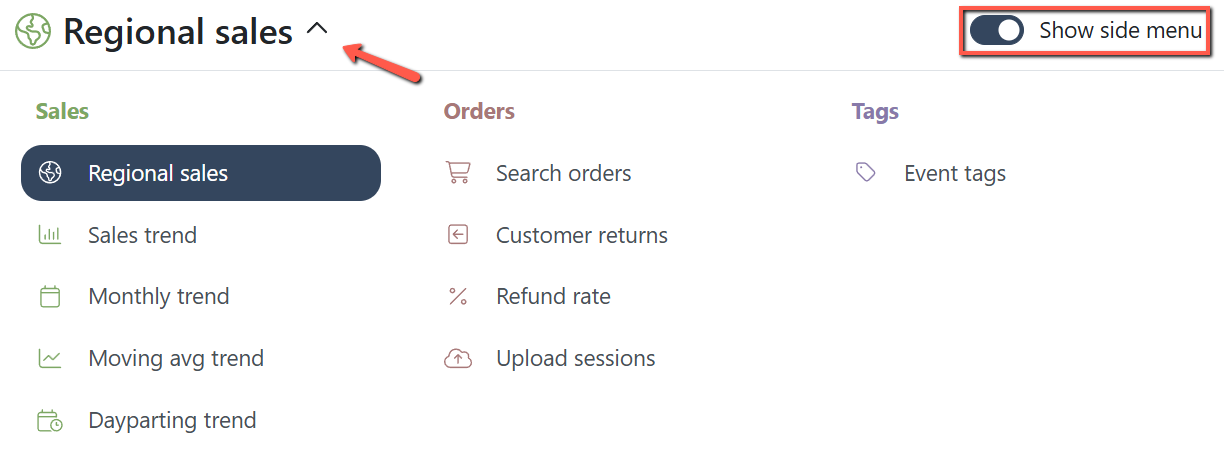
Rank Tracker: Add market share and share of voice data
Add SQP metric in the Bidding Rule
You can now set Bidding rules based on Search Query Performance (SQP) data for more precise bid adjustments. Check out the details in our June Release Note: Automation: Added SQP data as a Bidding Rule condition
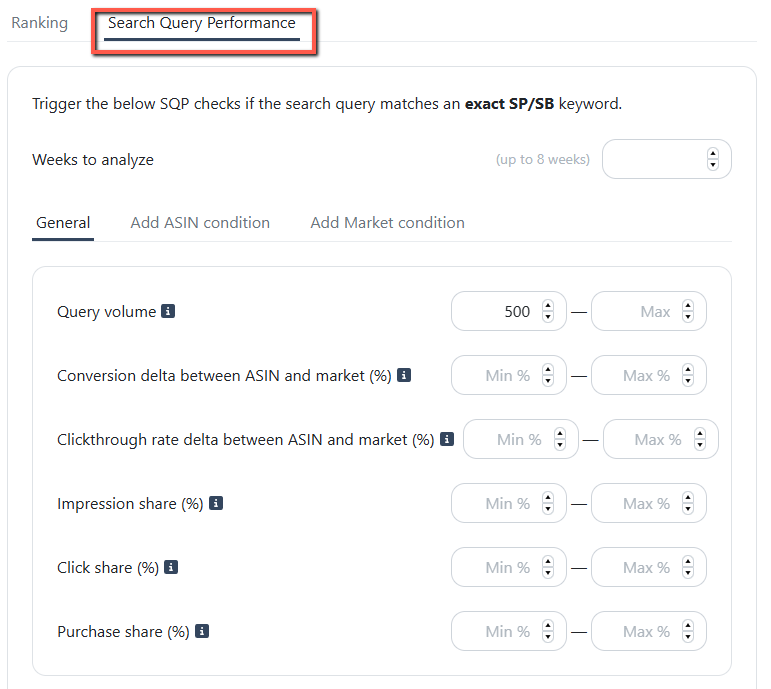
Add Search Term generated from Auto & Product/Category targeting campaigns in "Search Terms" under search term tab where Negative Keyword is also mentioned
The Search Terms page now displays ASIN search terms from Auto, Product, and Category targeting campaigns. You can now manually add these ASINs as negative product targets directly from the same page. Check the details in our April Release Note: Ads Insights: Enabled ASIN Search terms Negation
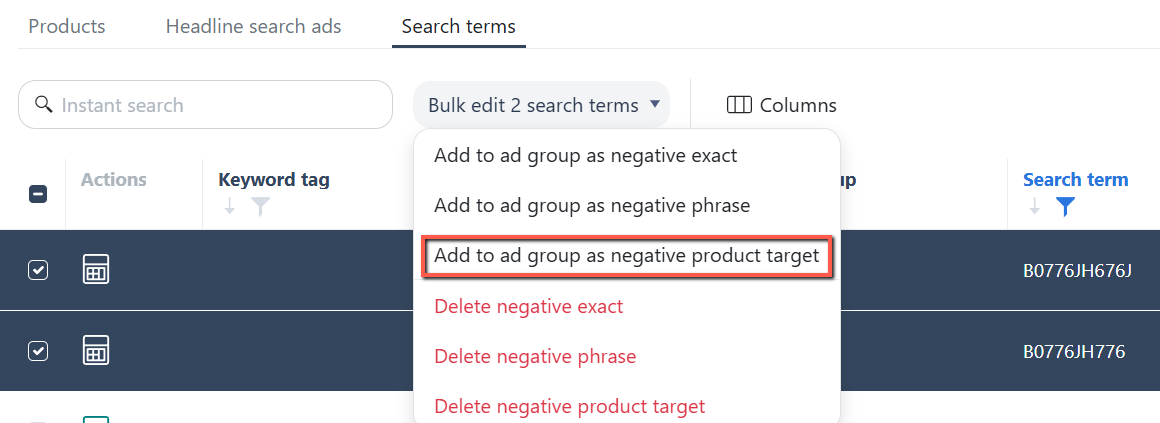
Change Log on Manual Edits Made on Campaigns, Ad Groups, Keywords & Placements
add the % change for all metrics
Paul is PPC manager in our team and he's suggesting for this new feature request (edited) Paul @Leslie Chong regarding that project, would it be really difficult to add the % change for all metrics? For example in the keyword tracking I would love to filter for keywords that have lost purchase share looking at the same week compared to last week.
Bulk Revert Bid Changes in Change Logs
Currently, the platform only allows reverting one bid action at a time in the Change Logs. For accounts managing thousands of targets, this makes correcting automation errors extremely time-consuming and impractical. Users need the ability to revert multiple bid changes in bulk when automation sets bids incorrectly (e.g., bids suddenly tripling across thousands of keywords). A bulk revert option would save significant time, reduce manual effort, and prevent performance or budget issues caused by unintended bid increases.
Automatic hourly data
Today, seeing your hourly performance in dayparting means exporting your Sponsored Ads hourly report from Seller Central and uploading the CSV into Scale Insights, and Amazon only keeps roughly the last month of that report in 14-day chunks, so it's a repetitive chore. This upgrade removes the upload entirely: your hourly PPC performance (impressions, clicks, CTR, spend, sales, ACOS, CVR and RPC) will stream directly into Scale Insights from Amazon via Amazon Marketing Stream, at the campaign and ad-group level, across Sponsored Products, Sponsored Brands and Sponsored Display. Your hourly heatmap stays current on its own, with a rolling four weeks of history, so you can read your best and worst hours and set bid modifiers from live data, with no exporting, no uploading and no gaps.
Inventory: Count units Amazon has received but not checked in
MCP: Filter campaign performance by budget constrained
MCP: Include Sponsored Brands in keyword and inventory tools
Marketplaces: Add Netherlands, Canada and Sweden
MCP: Revise the EconomicsNote guidance on break-even
MCP: Return refund rate on an order-date basis
Dayparting: Re-enable ad groups when a rule is switched off
Dayparting: Show an in-window status separate from paused
Automation: Account level analytics only mode
MCP: Return a complete parent ASIN map
Bidding Rule: Target each SKU's break-even ACOS
Change Logs: Show rank and sales movement after each change
Product ROI: Deduct VAT from break-even ACOS and profit margin
MCP: Exclude unsynced days from the 14-day growth split
MCP: Aggregate a parent and its children in one call
MCP: Include AWD and inbound pipeline stock
MCP: Per-child refund drivers in the daily data
Show ASIN performance stats on the Link Ads with ASINs page
TEST — Assign rules using AI
TEST — Run automation using Claude
Total Cost Value of all stock in 3PL and Amazon
Im on the inventory value page and want to know what the total value of all stock in my 3pl and in Amazon is. To be clear i want the cost value.
Sales trend page > Ability to show the ID details of refunded items
Currently, the Sales trend page shows the number of refunded units on "that" date. However, the actual refund item/order is not showing. It would be helpful if we could add the actual order ID for that specific date.
Show VAT amount on Sales Trend and other trend tables
Search Term page: Include Campaign, Ad Group, Keyword details in CSV report
Delete ASIN function
Ability to delete ASIN in all pages in SI.
Marketplace filtering
Marketplace filtering - enable and disable the marketplaces that users don't sell. Displays only the Marketplace that the user sells in.
Ability to Upload Custom Data for Sales Trend Report
To have the ability to upload custom data (e.g., from spreadsheets) into the Sales Trend report, allowing users to add their own columns such as weekly sales unit targets and compare them directly against actual performance within the platform. This enhancement would eliminate the need for manual reconciliation in external spreadsheets and empower users to track progress toward business goals in a single view. For example, a brand manager could upload a column of planned weekly unit sales targets and instantly see variances against actual sales, enabling faster course corrections and more informed decision‑making without leaving the reporting environment.
Ability to hide countries on the Regional Sales dashboard
I want to select the counties, and I am able to view the chosen countries' summary.
Enable Status rule for SB video keywords
Allow users to set individual VAT per product
In the current setup, we can only set the VAT for the account in general, which applies to all products across the marketplace. Some products in different marketplaces have different VAT %. So, allowing the user to set the VAT per product will help them gauge their profitability better. Source: https://app-na2.hubspot.com/help-desk/245731704/view/search/ticket/326755771072/thread/12821109459?query=326755771072
Change SQP date to end of period instead of the starting period
Update the SQP report date to reflect the end of the reporting period rather than the start. For example, a batch covering March 23–29 should display the date as March 29, not March 23. This helps to easily estimate when the next report will appear by simply adding 7 days. As of today (April 7), the latest visible report is still dated March 23, which creates confusion.
Rank Tracker: Dayparting may affect sponsored ads rank availability
Create multiple SKC of the same keyword with different bid tiers
Expand the type box of short name
When typing the short name of a product, it is almost impossible to edit the name due to a massive lack of visibility Request(what's the ask): In the Product Details page, make the short name type box expandable when typing or editing Reason for the ask: When editing the short name, it is hard to edit the short name of the product due to a lack of visibility Specific page(s)(if any or other info that is relevant): https://portal.scaleinsights.com/Products
Bidding Rule - Relink inactive ASINs
You can now easily relink the ad group for Inactive and Unlinked ASINs to any active ASIN directly from the Automation page. Read the details from our January Release Note: Automation: Enabled Relinking Inactive ASINs on the page
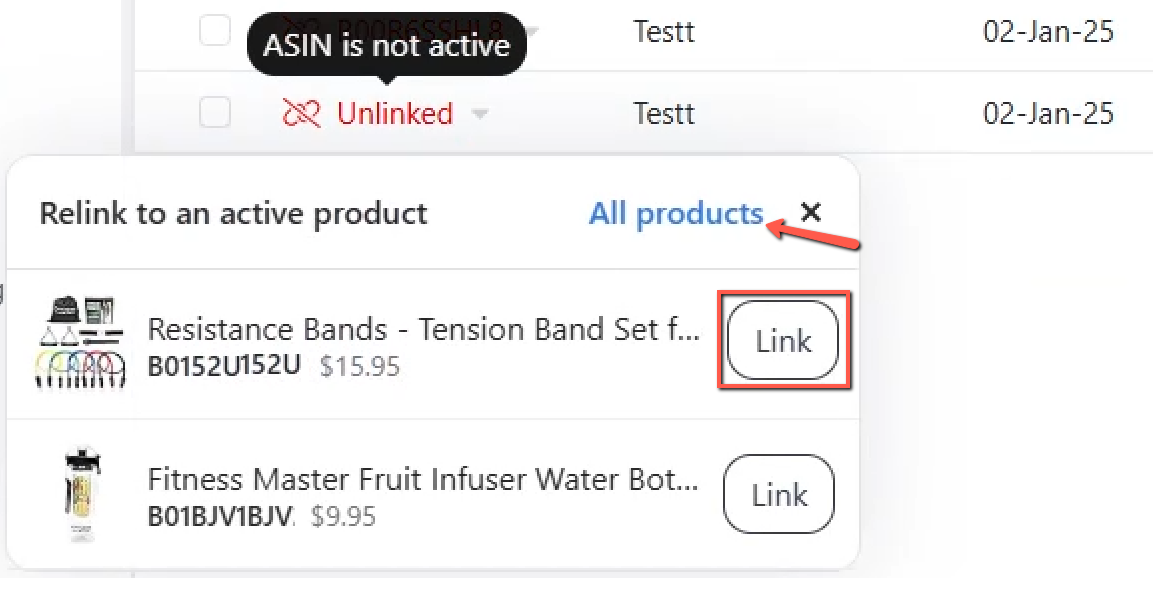
Observation Period for the rule itself
We would like to ask whether the Observation Period can apply only to the same rule, instead of blocking all rules for the same keyword / target. For example: After a 30D rule is triggered, only that same 30D rule is blocked during the 29-day Observation Period. However, if a 1D / 3D high-priority rule meets the criteria later, it can still adjust the bid. This would prevent long-period rules from repeatedly using the same old data, while still allowing short-period rules to react to recent poor performance. HS Link: https://app-na2.hubspot.com/help-desk/245731704/view/1325804265/ticket/326712218310/thread/12833106636#email
Parent ASIN column in Product Details page
Parent ASIN column to filter all the child ASINs associated
Ads Insights, Keywords tab the COGS and FBA Fees should be included in the P&L
The P&L calculation for the keyword should include the COGS and FBA Fees when the P&L is clicked, instead of downloading the CSV file just to see the COGS and FBA Fees in the P&L of the keyword, to save time.
Product ROI page: Maintain the "Fulfillment fee" value after entering "Expected Fulfillment fee"
Request from Keababies:
Remove/Cancel button for Placement rule Performance Criteria
When the user uses 3 performance criteria then later on decides that he/she wants to remove one of the criteria there is no way to remove it and the workaround is to create a catch all criteria or create a new rule which would be more manual labor for them.
Bidding rule: Factor in Halo on new bid computation
Currently, the tool only uses the keyword' ad sales data' to compute the optimal bid. With the Amazon Halo effect report, users can calculate the True ACOS of the keyword. For a brand with Halo sales, the actual ACOS (and the ACOS to target) would be lower than the ad report alone would suggest.
Automatic alert system that notifies you when sales tanked suddenly drop in a single day
Requesting an automated alert system that notifies when there are significant changes in ASIN performance, such as a sales drop (e.g., 30%–50%) or sudden changes in ad spend (e.g., 100% increase, drop to zero, or 80% decrease) compared to previous days.
Placement rule: Have option to dynamically adjust the placement % based on the new base bid by calculating the placement level RPC
Below is the concept. and snapshot holds the reference data of a single keyword campaign. Step 1: Set base bid below the poor CVR placement's CPC Product Pages CPC = $1.42. You set the base bid 10-20% below that. Base Bid = $1.42 × 0.85 ≈ $1.21 (taking the midpoint ~15% reduction) This means Product Pages (at 0% modifier) will now bid around $1.21, which: Reduces PP spend At 3.86% CVR and $1.21 CPC: ACOS = $1.21 ÷ (0.0386 × $84.32 AOV) = $1.21 ÷ $3.25 = 37.2% — still above target but significantly better than 43.53%, and with reduced volume from that placement Step 2: Calculate modifiers for RoS and ToS to hit 30% ACOS at each placement For each placement, what CPC do I need to hit 30% ACOS? Target CPC = Placement CVR × Placement AOV × Target ACOS RoS: AOV = $8,965.24 ÷ 109 = $82.25. Target CPC = 0.0931 × $82.25 × 0.30 = $2.30Modifier needed: ($2.30 ÷ $1.21) - 1 = +90% ToS: AOV = $1,770.85 ÷ 22 = $80.49. Target CPC = 0.0866 × $80.49 × 0.30 = $2.09Modifier needed: ($2.09 ÷ $1.21) - 1 = +73% I would love to have an automation that will drop the base bid to $1.21 and then adjust the modifiers to 90% for ROS and 73% to TOS.
Show Captured Ranking & SQP keyword stats in Change Logs
Users who create automation rules using Ranking and SQP criteria want the Change Logs UI to display the exact Ranking and SQP data values captured at the time the rule executed. Currently, Scale Insights only shows aggregated PPC stats for the keyword that was used when the rule was executed, which makes it difficult to understand why a rule triggered or to validate historical changes—especially for SQP‑based rules. What users want - Visibility into the specific Ranking and SQP values used when a rule ran. - Change Logs that reflect point‑in‑time data, not just weekly aggregates. - Better transparency and auditability for automation decisions driven by Ranking/SQP criteria. Why this matters Without access to the captured SQP and Ranking data, users can’t confidently troubleshoot rule behavior or verify that automations are working as intended. Showing this data directly in Change Logs would improve trust, clarity, and usability for advanced automation workflows.
Sponsored Video Ads – ASIN-Level Performance Visibility
Sponsored Video ads performance at the individual ASIN level is not currently available in Scale Insights (Sales Dashboard). Users can see Sponsored Video activity at a higher level, but they cannot identify which specific ASIN is driving sales, orders, or performance when running these ads. This makes it difficult for advertisers to evaluate Sponsored Video effectiveness, optimize budgets, or compare performance against Sponsored Products and Sponsored Brands at a product level. Any other additional info/reference that would help understand the idea The limitation appears to be driven by Amazon Ads API constraints, which do not currently expose granular ASIN-level attribution for Sponsored Video ads. Despite this, users are requesting: Clear confirmation and visibility of what Sponsored Video data is and is not supported Any possible ASIN-level reporting, estimation, or labeling if partial data becomes available Even clearer documentation or UI indicators around this limitation would help set expectations and reduce confusion. This feedback came directly from a customer discussion and reflects a recurring reporting gap raised by advertisers. Contact / Reference for clarification April (Scale Insights Support / CS)
Filter & Pause Ads Based on Inventory / Stock Level
https://www.facebook.com/share/p/18CzavehLE/ Amazon continues to serve ads for out-of-stock and low-stock products, causing unnecessary ad spend—especially for sellers with large SKU catalogs. It would be extremely valuable to add stock-level filtering in Ads Insights and Performance, allowing users to: - Filter product ads by stock status (out of stock, low stock, days of supply) - Bulk pause ads automatically or manually for SKUs with 0 stock or below a defined stock threshold This would be a major cost-saving feature for high-SKU sellers, helping prevent wasted spend and making Scale Insights even more impactful for inventory-aware PPC management. - Thomas
Show Reasons Why Rule Preview Will Not Execute
Currently, the automation preview displays rules as if they will run, even when conditions prevent execution, such as when an ad group is paused. This can be confusing because users expect the preview to reflect actual upcoming actions. To improve clarity and trust, the preview should display a clear reason whenever a rule will not be applied. For example, it could show a note like “Rule will not execute – Ad Group Paused.” This way, users can immediately understand why the action won’t happen and have more confidence in the automation system.
Support applying bid boost for AMC Audience
We've updated the Campaign Performance page to support bid boosts for AMC Audience segments in Sponsored Products and Sponsored Brands campaigns. You can now select an audience segment and apply a bid adjustment ranging from 1% to 900%. Check out the details in our June Release Note: Ads Insights: AMC Audience Bid Boosts
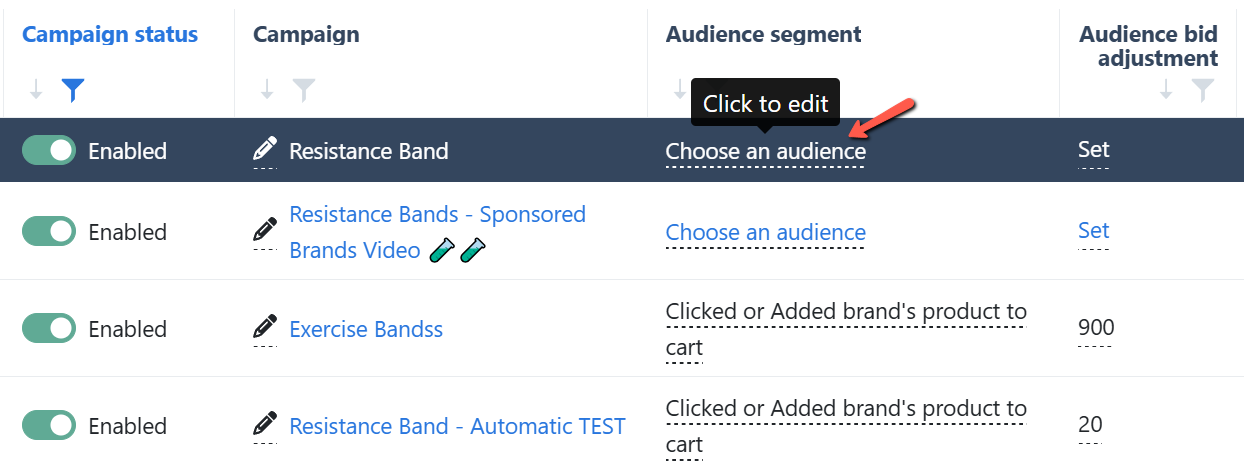
Keyword Ranking: Include the "amount of orders per keyword to rank organically"
I saw the new SQP report under the keywords ranking tab and it’s amazing! This saves us so much time to go through the brand analytics. Great job on that feature! I’d like to add a suggestion if that’s something that you might want to look into the future - a tab similar to H10's CPR where it shows you the amount of orders per keyword to rank organically. Request link: https://scaleinsightspteltd.slack.com/archives/C06EC1QDMMJ/p1762157010311759 - Jackie
Improve Accessibility of Training Videos
The training videos embedded in the Scale Insights knowledge base currently do not include fast‑forward or seek controls. This makes it difficult for users to revisit specific sections or skip ahead when reviewing material. Making training videos easier to navigate will help users learn faster, reduce frustration, and increase adoption of best practices. Video links: Video 1: The 1-Minute Strategy To Grow Your Sales: https://scaleinsights.com/video/the-one-minute-strategy Video 2: Scaling Your Organic Sales Fast: https://scaleinsights.com/video/scaling-your-organic-sales-fast Video 3: 8 Figure Advertising Blueprint: https://scaleinsights.com/video/8-figure-advertising-blueprint 4 quick ways to eliminate unnecessary ad spend: https://scaleinsights.com/video/4-quick-ways-to-eliminate-unnecessary-ad-spend Grow Your Organic Sales in 3 Simple Steps: https://scaleinsights.com/video/grow-your-organic-sales-in-3-simple-steps
Search Query Performance Across All ASINs/Account-level in each Marketplace
Search query performance data is only available at the keyword level within individual campaigns or ad groups. This forces advertisers to manually export and stitch together multiple reports, making it difficult to see how queries perform across an entire catalog in a selected marketplace. Use Case / Impact A consolidated, marketplace-level view would give advertisers a complete picture of customer search behavior across all ASINs. This would save time, reduce reporting errors, and make it easier to identify top and underperforming queries at scale. With these insights, advertisers could optimize keywords, improve product listings, and plan catalog strategy more effectively.
Regional Sales Filter PPC Cost Conversion to a Single Currency
Ability of PPC Cost Filter on Regional Sales Tab to conver all to a single currency to give more accurate comparison.
Include AWD Inventory in Restock Forecasting
Currently, the Restock Forecasting alert emails don’t include inventory stored in Amazon Warehousing & Distribution (AWD). This causes alerts to trigger even when there’s enough stock in AWD. Since AWD quantities are already reflected in the Restock Forecasting section, it would be great if the email logic could match that. Impact: Helps avoid false reorder alerts and improves inventory accuracy.
Add different time intervals in Main Dashboard table
Currently, the Main Dashboard table offers limited preset intervals—Today, Yesterday, 7, 14, and 30 days—alongside the “Sales by Date” view. While helpful for short-term monitoring, these options don’t support broader performance analysis. Adding selectable intervals such as Weekly, Monthly, Quarterly, and Yearly would enable users to identify longer-term trends, compare seasonal shifts, and make more strategic decisions without relying on external tools. https://www.facebook.com/share/p/1BwpGLKJbW/ -Thomas
Improve the color of the gray text in the input fields in rule creation
The border of input fields is so light in its bluish color that it's almost invisible. The only way I found it was I hovered the mouse on that empty area of the screen and then it appeared. If you tweak the Theme of your websites CSS file.
Campaign & target filters
Right now dayparting reads your hourly performance as one combined view, and you can't yet narrow it down to a specific part of your account. Once hourly data streams in automatically, you'll be able to filter the hourly grid by campaign, ad group, ASIN and target, and by date range, then set and apply bid modifiers at that level instead of across everything at once. That means you can bid up the hours that work for one campaign or product without touching the rest, and make dayparting decisions that match how you actually manage the account.